Pages

Showing posts with label windows feature. Show all posts

IP Forwarding - How to make Windows XP as a Router

2 comments


Do you aware that enabling IP forwarding using Windows XP Professional will make it as a simple router, so that you can have 2-3 different networks at home and those computers manage to talk to each other from different network. The router is needed to send/receive the traffic from one network to another network or access Internet. The benefit is you don’t have to buy additional router and so can save some money. This approach is not so common practiced in Windows XP, but it works.
As an example, let say you have 7 computers and 2 network switches, and need to create 2 networks that can access Internet, so how to do it?? Some more information, one of the computers is equipped with 3 network cards and one of the network cards is connected to cable/DSL modem to access Internet, so this computer will act as a router!


Configure the network cards on the router with following information.

Router (Windows XP Professional)

Network Card A (connect to network A):
IP: 10.10.10.1
Netmask: 255.255.255.0
Gateway (GW): [leave it blank]

Network Card B (connect to network B):
IP: 192.168.20.1
Netmask: 255.255.255.0
Gateway (GW): [leave it blank]

Network Card C (connect to Internet via cable/dsl connection)
This information will be based on the Internet connection service which you have subscribed. 
IP: 192.168.1.1
Netmask: 255.255.255.0
Gateway (GW): 192.168.1.1

Configure all the computers in network A with following information.

Network A 
IP: 10.10.10.2-254
Netmask: 255.255.255.0
Gateway (GW): 10.10.10.1

Configure all the computers in network B with following information.

Network B 
IP: 192.168.20.2-254
Netmask: 255.255.255.0
Gateway: 192.168.20.1

Ok.. Now it’s the time to configure IP forwarding on that router…

1) Go to Start and click Run…, then type in regedit to run registry editor.


Note: Please note that only System Administrator can run registry editor.

2) Registry editor window will appear. Browse for the following registry key at the left hand side window:

HKEY_LOCAL_MACHINESYSTEMCurrentControlSetServicesTcpipParameters

Right click IPEnableRouter registry object, and click Modify.

Note: Be extra careful when you deal with registry editor, wrong editing will crash you Windows OS.


3) The IPEnableRouter window will appear. Type 1 as Value data and click OK.


4) Close the regisrty editor and reboot the computer. After rebooting, all the computers should be able to access Internet and also share the file/printer between network A and B.
Note: When I did the test, IP forwarding will only work after rebooting the computer. So don’t forget to do it.



Immediately Hide Your Desktop Work By See Anyother

1 comments


This is my favorite way of hiding things from others, and the great thing is that Virtual Desktop Managers can also be used to actually get some work done. Virtual Desktop Managers are programs that allow you to have multiple desktops within your own desktop, making it easier to work on separate projects.
For example, you could have games on one desktop, blogs on another, and whatever you’re working on on the third desktop. It’s really a handy way of organizing your desktop. The best thing about it is that you can use most Virtual Desktop Managers to hide your active windows from those prying eyes.

For You i m going to making 3 Desktop where 2 virtual and One Real.

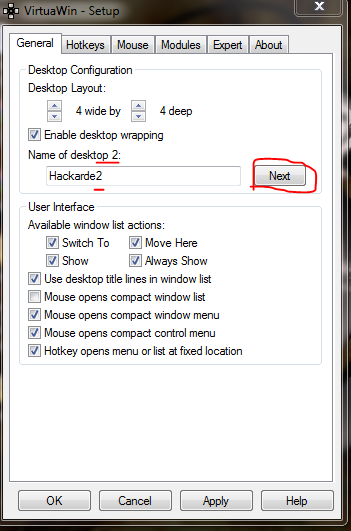
When you open your VDM then it look like below pic,feel up like below pic...


Click "Next" and make new again ....


As well as Hackarde3....


When you click "Apply" and Ok then on desktop left side in bottom you see icon like below pic...


Click Right Key on them and select your Desktop.


Make Encrypted Folders Others Can’t View it on your Hard Disk

0 comments


Click the Create Volume button to build that container we were talking about.


When you did it,then you see below pic window click on next.


Click on Standard nd again Next.


Set Volume location by Click on "Select File"...


Make new volume like below pic...


Set Your Encryption Algo like below pic...


Set Volume size,wht u want....


Write volume password...


Set volume format and take a rest...


Message come like below pic...


Volume create click on Exit.


HOW TO USE THIS VOLUME:


Click on Container which you select first time.


click on "SELECT FILE" like below pic...


Open your make volume...


Main work here,click on Mount...


Enter your password..


Your volume open like below pic...


Go and use it..


For again Encrypt and hidden click on "DisMount".


Make Christmas With Your Computer

0 comments

Make your Christmas with your computer system.I am given you a gift on this Christmas who given you a Snow Flow feelings on your PC screen like below pic...


For this only download this Software Click Here


When you open this software then without installation you see a window like below pic...


Here set your settings and make Christmas with your PC.

Update Windows OS without Internet

5 comments

My today thread tell you how update all Windows Operating System without Internet connection.So follow my steps and done it successfully.

STEP 1: Go to Internet Cafe with your Pen Drive (PD) and Download AUTOPATCHER .After that Open it.
STEP 2: When you open the AUTO PATCHER it look like below pic.Here choose your version of OS you want update and click on next.


STEP 3: When you click next then it start download update like below pic...


STEP 4: After downloading then insert your PD in System and copy all the Download in your PD.

STEP 5: Come Home and Insert your PD in your system and Update your system successfully.


Use Your Pen Drive as RAM

3 comments

Today i am tell about a trick by which you use your Pen Drive as a RAM and increase your system RAM successfully. Two different trick for different version of Windows. My first trick for Windows Vista and 7 and second trick for Windows Xp and below version.

So let's start.

TRICK 1:

This trick work for Windows 7 and Vista by which you use your Pen Drive as a RAM(Random Access Memory).

1. Insert your Pen Drive in system and go to property of Pen Drive by Right Click of Mouse.

2. Property Window open like below pic. Here click on "ReadyBoost Tab" and then you see radio button in which write "Dedicate this device to ReadyBoost". I am show it red color box in below pic...


3. Set your MB memory according to your requirement,and Press OK. All important work show in above picture.

TRICK 2:

This trick work in Windows Xp and below version but here i am use a Software which name is "ebooster" by which you change your Pen Drive space into RAM.

For Download Software Click HERE

1. When you download this software then you found a WinRAR file then extract it and Install software.

2. After Installation go to START and open "ebooster" then you see window like given below pic...


3. First select your Pen Drive in "Select Memory" option and then set require memory in MB then press OK.


I think it very helpful for you if you want use HARD DRIVE as a RAM then READ my old post...


If you like my work so plz follow my blog.

Recover Windows Deleted Data

1 comments

This post tell you about recover your deleted data from your system memory successfully.It is very help full in case of you delete some data by mistake.

First download Tool from HERE
How To Use This Tool ?

After installation when you open this software then it shown like below window,here click next button.


After it you see below window where some option given for direct recovery but if your want not present in list then click "other" and Next...


Here choose "In a specific location" and Browse Folder which you want recover like below pic...


In next window check mark "Enable Deep Scan" and press Start like below pic...


Process start like below pic...


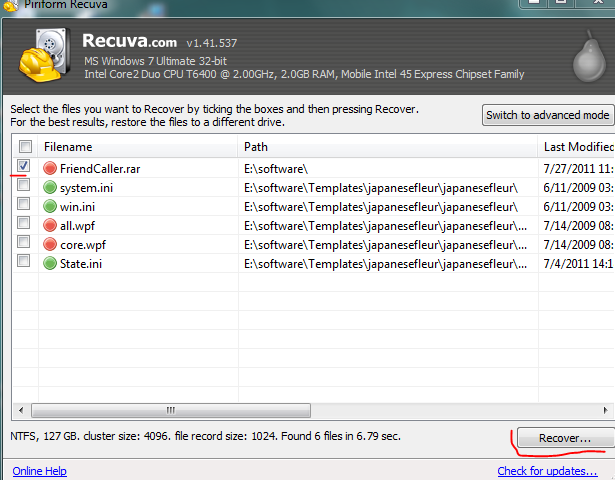
After all of this it given you file name like below pic,here choose your file and click "Recover" button...


When you press the Recover button it ask you "Select location for recovery" where you choose your folder where you want save recover file.You also make new folder like below pic..


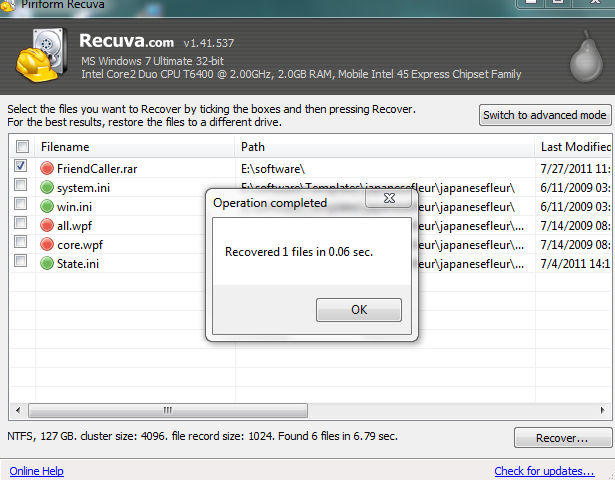
When successfully process done then a window pop-up like below pic...


Go to your folder who make or select by you for save recover data or file.

NeatSurf-Secure your surfing

0 comments

NeatSurf is a powerful and easy to use IE privacy security utility it prevents writing your IE browser's history, cache, cookies, user data, etc...
When you visiting cybercafe or using any other public computer to buy something over the internet using your credit card, or entered any other sensitive information into the webbrowser's window, you cannot be absolutely sure that this information is not cached somewhere.
NeatSurf is designet to protect you in such situation, to make sure that other people cannot see your data or which sites you visit.

NeatSurf is the Product of Matcode Software.


How to use NeatSurf
Just download and run NeatSurf.exe. It will start an instance of Internet Explorer and continue to run until IE browser is opened.

For Download NeatSurf Click

Remove Malware before your Antivirus

0 comments

Malware is software designed to infiltrate or damage a computer system without the owner's informed.Malware is software designed to make a computer do something an attacker wants it to do. It is not always designed to destroy a computer.

If a new malware hits the net, and it takes two weeks for your antivirus vendor to deploy a signature file, your computer or site is exposed and entirely susceptible to the infection.If your antivirus detect this new malware but it can not removed it without the Signature file which you found when you update your antivirus.

So what are we doing in this case ?

Not fear with my word which i am say above because i am going tell you how you removed new hit Malware from your system.

First Download a Tool which name Regshot from HERE

What is Regshot and how it work ?

Regshot is a small,free and open-source registry compare utility that allows you to quickly
take a snapshot of your registry and then compare it with a second one snapshot- done after doing system changes or installing a new software product. The changes report can be produced in text or HTML format and contains a list of all modifications that have taken place between
snapshot1 and snapshot2. In addition, you can also specify folders (with sub filders) to be
scanned for changes as well.

(1)CLICK "1st shot" BUTTON
It pops up a menu which contains several items:
(A)"Shot" to take a snapshot only,and it will not be kept if you exit regshot program;
(B)"Shot and save..." to take a snapshot of your registry and save the whole registry to
a "hive" file and you can keep it in your harddisk for future use;
(C)"Load..." to load a "hive" file previous saved.

(2)RUN or Install SOME PROGRAMS which may change your windows registry,or it may change the file system.

(3)CLICK "2nd shot" BUTTON

(4)Select your output LOG file type,"text" or "HTML,default is "text"

(5)INPUT YOUR COMMENT for this action into the "comment field",eg:"Changes made after
winzip started". COMMENT will only be saved into compare log files not into "hive" files

(6)CLICK "compare" BUTTON
Regshot will do the compare job now(auto detect which shot is newer),when it is finished,
Regshot will automatically load the compare LOG as you defined above,the log files are
saved in the directory where "Output path" is defined,default is your Windows Temp Path
,it was named as the "comment" you input,if the "comment field" is empty or invalid, the
LOG will be name as "~resxxxx.txt" or "~resxxxx.htm" where "xxxx" is 0000-9999.

All step you watch in below pic..


When You Watch compare file it show all the changement in the registry.New software often drops keys all over the place in the registry, but is too lazy to remove them upon uninstallation of the software. This makes the registry quite a mess.

Means when you uninstall your software then only those file remain left which not come in the software application which means this is the Malicious Code file(Malware) and your work remove it manually and save your system by new hit malware attacks.


If you like my work so plz forward your comment.

Microsoft Security Update Guide

0 comments

This post about the Microsoft Security Update and his Guide who tell you enhance and use of Microsoft security features.
This guide helping IT Professional Better Understanding and maximize Microsoft Security Update release information,Process,Communications,and Tools.


After success of First Edition Microsoft launch Second Edition with more Update.This Second Edition of the Microsoft Security Update Guide includes additional content describing how Microsoft tests security updates before they are released, revised advice and guidance on testing updates in your own environment, and an expanded and updated resources section. Our goal with the Guide is to help IT professionals manage organizational risk and develop a repeatable, effective deployment mechanism for security updates. In the Guide, you will find a convenient glossary of terms, an overview of the Microsoft Security Bulletin process, and a stage-by-stage review of Microsoft Security Updates. The Guide is organized according to the following stages of the security update process:

Stage 1: Receive Microsoft Security Release Communications
Stage 2: Evaluate Risk
Stage 3: Evaluate Mitigation
Stage 4: Standard or Urgent Update Deployment Timeline
Stage 5: Monitor Systems, and; Ongoing Stage, Watch. Each section outlines the purpose and objective for that stage, as well as the expected target outcomes upon that stage’s completion.

For Download This Guide Click Here

How Hack a Website by IIS Exploit

10 comments

Today,i am make too interesting thread because this post number 100 on my blog means today your favourite blog Hackarde completed his 100 post.

Many new hacker said me that i makes a simple thread on Website Hacking because i think without site hacking it is never possible come a fun in Hacking,so i am present in front of you with this thread which helpful for you.

First about what is IIS Exploit and how i am hack a website by this help?

IIS (Internet Information Service) is a Microsoft Service like Apache Server which provide you his service on server handling.

A hacker has posted code on his Milw0rm website that could be used to attack a system running Microsoft Internet Information Services (IIS) server and install unauthorized software on it. The good news is that the attack appears to work only on older versions of IIS—versions 7.x are not affected. The flaw resides in the File Transfer Protocol (FTP) software used by IIS to transfer large files, meaning that FTP must be enabled for an attack to be succesful. The risk posed by this vulnerability isn't completely clear yet, but Microsoft says it is looking into the issue.

In short IIS Exploit helpful for you to upload your Deface page on website server without any ID and Password authentication requirement.

So why i am waiting Let's go.


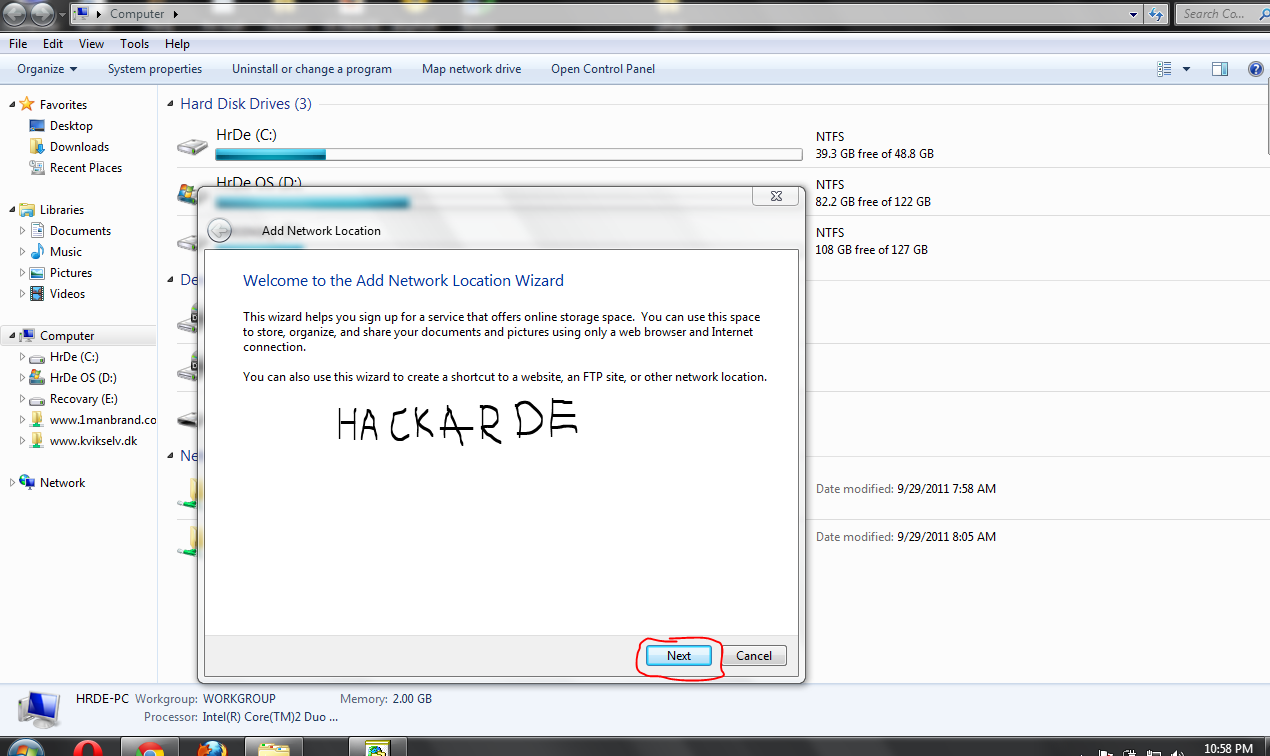
In First step go to your MyComputer Home page and click right side button of mouse on Window you see some option View by,sort by,group by with a option " Add a network location " click on the Add a network Location you see a new window like given below...


Click on the Next Button,when you click on next then a new window open like below again click on Next button...


After all above work you see a new window where it ask to Specify the location of your website,Here enter the name of IIS Exploit website which you want to hack,but always remember when you enter a site name then always write http:// before the www.sitename.com,you see a picture given below...


After enter your website(Which vulnerable for IIS) name you click on Next button and in last Click on Finish button with tick the option Option this network location when i click finish, Here you see a window like given below...


Here you copy paste your name HTML file which you want upload on the site like below picture...

If you don't make a HTML file for upload please make it.You also take help of www.W3school.com site for make HTML file.

After copy paste,Double Click on the paste HTML file then you see your browser open where your make HTML page uploaded with name of site,in my case this like...

file://///emamali.parniansis.com/DavWWWRoot/HrDe.html

Where emamali.parniansis.com is website name and HrDe.html my uploaded file name.

After it,please change your URL Address from above link to

www.emamali.parniansis.com/HrDe.html

Then you see Browser page like given below page...


Congrats! man you hack a IIS Exploit Site.

I think you like it,this thread take 4 hour for write but you only spend 1 minute for a good thank.


I am going to post some IIS Exploits site for Practice......


http://baikeshow.baikejob.com/
http://51yibiao.com/
http://bm.51yasi.com/
http://bm010.com/
http://card.baoanren.com/
http://e.pmmp.com.cn/
http://edutvcn.com/
http://geo.it/
http://vjob.or.kr/
http://www.3d-2008.com/
http://www.experienceit.co.za/
http://www.fondazionefimp.org/
http://www.ljmjfj.com/
http://www.lsqqby.cn/
http://www.pxry.gz.cn/index
http://www.qddajiang.com/
http://www.qdshibei.gov.cn/
http://www.schongyang.cn/
http://www.sonachaandi.us/
http://www.sxcitc.cn/
http://www.sxxart.com/
http://www.vanimpesubdivision.com/
http://www.xuandags.com/
http://www.xzdm.gov.cn/
http://www.y888888.com/
http://www.yuhuangd.com/
http://xatcd.com/
http://xljk.cumtb.edu.cn/
http://yuehu.wspc.edu.cn/
http://0515sydn.com/index.txt
http://1manbrand.co.uk/
http://30wx.com/
http://axcy88.cn/
http://3woods.com/index.txt
http://51yibiao.com/
http://9buys.net/
http://acalstar.com/
http://bbs.tiaofun.com/
http://bendavidsalons.com/
http://bj.maifun.com/
http://bm010.com/
http://bnd.ic-trade.com/
http://btwyp.com/
http://buxingjie365.com/
http://bbs.6639111.com/
http://ad.aiyag.com/
http://buxingjie365.com/
http://bx.xsxgxx.com/
http://card.baoanren.com/
http://agent.dns110.com/
http://app.earthsearch.us/
http://aqcdc.org/
http://asjtfw.com/
http://autoqingdao.com/
http://che78.com/
http://crbbg.com/
http://crm.gongrenzhaopin.com/
http://cs.maifun.com/
http://dalimj.com/
http://devarkalyanam.com/
http://disk.hzyhzhx.com/
http://dragonit.co.il/
http://ecoricambi.com/
http://edsv-seal.com/
http://eisjasper.com/
http://fashionwoodworks.com/
http://gpa.tmk.ac.th/
http://grandsoluxehotel.com/
http://habitatstoreonline.com/
http://ifix.freshcode.co.za/
http://infoprompt.net/
http://jindugardenhotel.com/
http://jsj.ahiec.net/
http://kvikselv.dk/
http://longhuong.com/
http://lzsx.sclz.net.cn/
http://member.wealth-mentors.com/
http://moto.velik.org/
http://murgie.co.uk/
http://my.scqiche.net/
http://mytel070.co.kr/
http://navecomp.com/
http://oelerfamily.net/
http://pcfan.com.tw/
http://punchaboveyourweight.com/
http://qzy.resumstore.baikejob.com/
http://safety.corna.biz/
http://sds.co.in/
http://shanghai.gufeiyong.com/
http://sialn.com/
http://sjxyz.cn/
http://sjzasd.com/
http://sqqsxx.pyedu.cn/
http://stihl.rental2k.it/
http://sts.ntue.edu.tw/
http://superbolao.lancenet.com.br/
http://tcc.e-bestis.com.tw/
http://tp.tourispac.ch/
http://training.oristand.com/
http://tw.baskr.com/
http://vinayakford.com/
http://www.11jm.com/
http://www.365health.co.nz/index.txt
http://www.66198198.com/
http://www.913173.com/
http://www.airedale-gp-training.co.uk/
http://www.astromagus.com/
http://www.bakeryzone.co.kr/
http://www.bikeb2b.net/
http://www.bjqxb.com/
http://www.caferotshild.co.il/
http://www.campusvirtuales.com.ar/
http://www.china-consumer.net/
http://www.chz114.com/
http://www.dailymailoffers.co.uk/
http://www.datasa.co.za/
http://www.df-lighting.com/
http://www.dnn.catalystlearning.com/
http://www.dpa.com.ve/
http://www.dzslyy.com/
http://www.es168.cn/
http://www.euicex.com/
http://www.glaucomadisease.com/
http://www.hfis.cn/
http://www.ilconsulente.net/
http://www.jeeptrip.com/
http://www.jindr.cn/
http://www.jjcrj.com.cn/
http://www.jjgas.com.cn/
http://www.kinemo.com/PCH.html
http://www.kuilongstone.com/
http://www.lautianlu.com.tw/
http://www.leaderkx.com/
http://www.lfdf.net/
http://www.lichangzhu.com/
http://www.magalhaesturismo.com.br/
http://www.mailscan.nu/
http://www.mo5.cn/
http://www.momaxx-trading-gmbh.de/
http://www.neurologiarj.com.br/
http://www.operasurgery.co.kr/
http://www.overseadivecenter.com.br/
http://www.psdp-egypt.info/
http://www.qasoft.com.cn/
http://www.qhdpt.com/
http://www.r80rugby.co.nz/
http://www.rechonchee.com.br/
http://www.shuzifun.com/
http://www.sinpang.com/
http://www.skhlmcmps.edu.hk/
http://www.thedepository.biz/
http://www.tudodabolsa.eti.br/
http://www.tzdcw.cn/
http://www.whitesandstours.ae/
http://www.xalawyer.net/
http://www.yanglao99.com/
http://www.zfrt.net/
http://www.zjtiger.com/
http://www.zxly.gov.cn/
http://www3.office-sp.co.jp/
http://xfjtmy.com/
http://xsc.ahiec.net/
http://you-inspire.co.uk/
http://ystjy.com.cn/
http://yxtypx.cn/
 
 
Enjoy Hacking!

Related Posts Plugin for WordPress, Blogger...

Hackarde's Search Engine- Search Hacking Tutorial,Tool and eBook

Loading
 
HACKARDE © 2011 | Designed by HrDe