Pages

YouTube Launches YouTube For Schools & Educational Content

0 comments


YouTube Launches YouTube For Schools & Educational Content


YouTube Launches his Only Educational Content for Schools Student purpose who totally safe features. So join it...


For Go to Click Here

Make Christmas With Your Computer

0 comments

Make your Christmas with your computer system.I am given you a gift on this Christmas who given you a Snow Flow feelings on your PC screen like below pic...


For this only download this Software Click Here


When you open this software then without installation you see a window like below pic...


Here set your settings and make Christmas with your PC.

Make Your iPhone a Wi-Fi Hotspot-Part 1

1 comments

Jailbreak a application which come for iPhone and iPad and break the feature of Apple gadgets and by this you use application those never run on Apple device. So i think this is the best Hacking Tool for Apple gadgets.

In first part i am tell you how to use Jailbreak with your Apple iPhone and iPad,And in second part tell you how you make your iPhone a Wi-Fi Hotspot by use of JailBreak.

Before use it make your iPhone or iPad backup for only safety.


1. Verify you're running the latest version of iTunes (9.1.1). The iPad should be running OS 3.2.
Download the Spirit jailbreak for Mac or PC.

2. Connect the iPad, iPhone or iPod Touch to your computer using the USB cable.
Run the Spirit jailbreak application.

Windows users may need to run the program as an administrator -

Right-click on the .exe file and choose "Run as Administrator" from the menu.

If you still have issues, try running it in compatibility mode as well.

Right-click,
Go to Properties,
Compatibility tab,
Check the box "Run this program in compatibility mode for Windows version.

Watch below pic...


3. Click on "JailBreak" button like below pic...


4. The iPad will automatically reboot.

Once rebooted, you'll see the "Cydia" application installed on your iPhone/iPod Touch/iPad's desktop. From here, you have access to all the unapproved, third-party applications.

This is the last step of Install Jailbreak for you iPhone and iPad.Wait for second part i will be back in small time with Part 2.

Top 10 iPhone Security Tips-By McAfee

0 comments

Who love Mobile Gadgets always choose iPhone in his collection,without tell about iPhone,list of good Gadgets never complete.But also good feature of iPhone his security problem increase which remove by Apple time with time.

My today post help you remove the risk in security of iPhone and make it secure and too helpful for you.


Update Windows OS without Internet

5 comments

My today thread tell you how update all Windows Operating System without Internet connection.So follow my steps and done it successfully.

STEP 1: Go to Internet Cafe with your Pen Drive (PD) and Download AUTOPATCHER .After that Open it.

STEP 2: When you open the AUTO PATCHER it look like below pic.Here choose your version of OS you want update and click on next.


STEP 3: When you click next then it start download update like below pic...


STEP 4: After downloading then insert your PD in System and copy all the Download in your PD.

STEP 5: Come Home and Insert your PD in your system and Update your system successfully.


New Facebook Worm installing Zeus Bot in your Computer

0 comments

Today another new attack on Facebook users with Zeus Bot comes in action. The researchers of Danish security firm CSIS, has spotted a worm spreading within the Facebook platform. A new worm has popped up on Facebook, using apparently stolen user credentials to log in to victims' accounts and then send out malicious links to their friends. The worm also downloads and installs a variety of malware on users' machines, including a variant of the Zeus bot.


If followed, the link takes the potential victim to a page where he or she are offered what appears to be a screensaver for download. Unfortunately, it is not a JPG file, but an executable (b.exe). Once run, it drops a cocktail of malicious files onto the system, including ZeuS, a popular Trojan spyware capable of stealing user information from infected systems. The worm is also found to have anti-VM capabilities, making it useless to execute and test in a virtual environment, such as Oracle VM VirtualBox and VMWare.

Zeus is a common tool in the arsenal of many attackers these days, and is used in a wide variety of attacks and campaigns now. It used to be somewhat less common, but the appearance of cracked versions of the Zeus code has made it somewhat easier for lower-level attackers to get their hands on the malware. Zeus has a range of capabilities, and specializes in stealing sensitive user data such as banking credendtials, from infected machines.

"The worm carries a cocktail of malware onto your machine, including a Zbot/ZeuS variant which is a serious threat and stealing sensitive information from the infected machine," warn the researchers.The worm is hosted on a variety of domains, so the link in the malicious message may vary. Other servers are used to collect the data sent by the aforementioned malware and to serve additional malicious software.


This type of thing is very rare to just send to your email without you requesting it so I would advise anyone who thinks that you may have seen an email like this to delete it and mark it as spam right away.

Source: The Hacker News

Change WebPage into PDF

1 comments

Too interesting Headline,My this trick help you change a Web Page into a PDF File very easily only by use of Gmail,ya this trick done by Gmail.

First Go to your Gmail account and Click on "COMPOSE" tab for write the Email like below given picture and in "To" write

submit@web2pdfconvert.com


Like below picture and in "Subject" and in "Message" type the Full Website address in my case i am write my blog name,watch below pic and after that "Send" it.


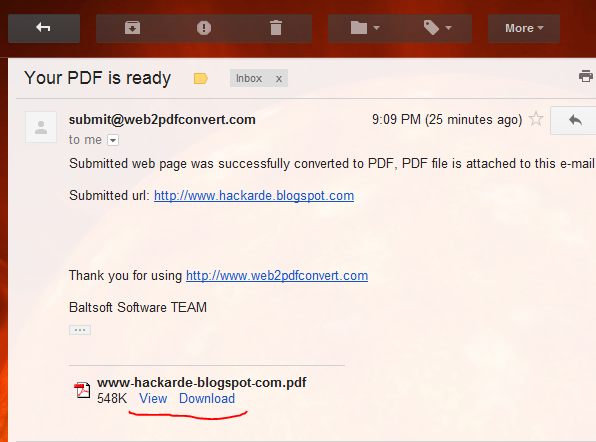
Wait For 5 to 10 Minute then you found a message in "INBOX" open it,this Email look like below pic...


Click on "VIEW" or "Download" option then you see PDF file of my blog like below pic...


Try it with different Website and given your good reply in comment Box.

If you like my work So plz Follow it.

Use Your Pen Drive as RAM

3 comments

Today i am tell about a trick by which you use your Pen Drive as a RAM and increase your system RAM successfully. Two different trick for different version of Windows. My first trick for Windows Vista and 7 and second trick for Windows Xp and below version.

So let's start.

TRICK 1:

This trick work for Windows 7 and Vista by which you use your Pen Drive as a RAM(Random Access Memory).

1. Insert your Pen Drive in system and go to property of Pen Drive by Right Click of Mouse.

2. Property Window open like below pic. Here click on "ReadyBoost Tab" and then you see radio button in which write "Dedicate this device to ReadyBoost". I am show it red color box in below pic...


3. Set your MB memory according to your requirement,and Press OK. All important work show in above picture.

TRICK 2:

This trick work in Windows Xp and below version but here i am use a Software which name is "ebooster" by which you change your Pen Drive space into RAM.

For Download Software Click HERE

1. When you download this software then you found a WinRAR file then extract it and Install software.

2. After Installation go to START and open "ebooster" then you see window like given below pic...


3. First select your Pen Drive in "Select Memory" option and then set require memory in MB then press OK.


I think it very helpful for you if you want use HARD DRIVE as a RAM then READ my old post...


If you like my work so plz follow my blog.

Find and Remove Carrier IQ from your Android Device

1 comments

We are use Carrier IQ for performance monitoring of the Smartphones means it is a service software by which your Smartphone secure but some researcher think it might be Key-logger or root kit by which your smartphone may be under risk.

Carrier IQ makes a new software that may be looging your every move of your Smartphone.

So if you want to check or if want this Keylogger removes from your Android Device then you can use LOGGING CHECKER developed by Trevor Eckhart.

This application help you to check logging activity which going in your mobile and also know where the logging data is going to.


This is a key for unlocking pro cleanup and removal features of logging test application.This is ONLY a license file, and must be installed after the main application is. Root is required because it will also install proper binaries required to system if they dont exist. You may uninistall this app completely 15 minutes after you activate your license.


National program for Cyber army to be launched in India

0 comments


Increasing attacks on cyberspace in India has brought several professionals and experts from the Industry, in support with the Government of India to jointly form a national level program to identify credible and valuable information security experts. The program "National Security Database" is all set to launch this Saturday in Mumbai at a major Information security conference, MalCon. The database will include ethical hackers and programmers who can protect country’s cyberspace. They will all be registered with the National Security Database, a brainchild of Information Sharing and Analysis Centre (ISAC), a non profit foundation which works closely with the Government on the issue of cyber security.

The need of such database originated after 2008 attacks in Mumbai when the cyber security professionals realised that a lot needed to be done in the area. "It is observed that some or other form of electronic notification is usually sent before a major terrorist attack, followed by defacement of government web sites. Professional cyber security professionals can make a lot of difference in investigations and help in the entire episode," said Rajshekhar Murthy, director of ISAC. Issue of forming a credible repository of such cyber security professionals who can be trusted with sensitive information can be of use in case of an emergency, and was also raised in a conference held last year.

"After a lot of brainstorming and analysis the database is in place and will be flagged off on November 26 in Mumbai," said Murthy. As per estimates there are over a lakh cyber security experts and hackers in India who as of now function individually. Each one of them has a certain area of specialisation. "They will be brought in to the NSD after a rigourous test which would test their skills. Also they would be made to undergo psychometric tests over and above the tasks that they would have to perform to test their personal skills. Once they clear all levels they would be empaneled in NSD program in applied areas of specialisation," added Murthy. Fraud investigation, web security, mobile security are some of the areas of specialisation in NSD.

The Database, which was secretly being worked on from last two years on invitation only basis has already a sizeable number of experts who have developed malwares and softwares to hack into devices like iPhone and XBox Kinect, which are slated for release at the malware conference MalCon. The database will come in handy each time country is under threat on cyberspace front. "The next generation of attacks will not be only on ground but also on country’s cyberspace," said Murthy citing the example of recent attack on some government computers after which the hackers released sensitive information pertaining to the miltary and communication between India and Moscow.

Companies like QuickHeal and Security Compass among others have already given support to the database and will be hiring security professionals with a direct final interview. "Since NSD professionals will have to go through a tough eight hour lab exam, major companies have written in expressing their interest in hiring NSD empaneled professionals. While NSD does not award certification, we are glad about the support from the Industry" stated Murthy.

The biggest challenge for NSD now is to reach both hackers and professionals and identify them with skills in existing areas of specialization.. "We have already identified several accross the country. Their motivations is that once they are registered with NSD they not only get to upgrade their skills and knowledge but will also be of service to the country. We are collaborating with government agencies looking after cyber security, all of whom are looking forward to the NSD," said Murthy.

The program will be flagged off in the International Malware Conference, MALCON, scheduled to be held at JW Marriott on November 26. Sachin Pilot, Minister of State for Communication and Information Technology is also going to join the conference via video conference from Delhi. His office confirmed that Pilot would share his views on cyber security and extend their endorsement to the National Security Database. Officials from National Technical Research Organisation, a government body which looks at cyber security, too have shown keen interest in the NSD. "It is great initiative which will be of use to the nation and will provide a databse of cyber security professionals," said an NTRO official refusing to be named.

Related Posts Plugin for WordPress, Blogger...

Hackarde's Search Engine- Search Hacking Tutorial,Tool and eBook

Loading
 
HACKARDE © 2011 | Designed by HrDe