Pages

Top 10 iPhone Security Tips-By McAfee

0 comments

Who love Mobile Gadgets always choose iPhone in his collection,without tell about iPhone,list of good Gadgets never complete.But also good feature of iPhone his security problem increase which remove by Apple time with time.

My today post help you remove the risk in security of iPhone and make it secure and too helpful for you.


Update Windows OS without Internet

5 comments

My today thread tell you how update all Windows Operating System without Internet connection.So follow my steps and done it successfully.

STEP 1: Go to Internet Cafe with your Pen Drive (PD) and Download AUTOPATCHER .After that Open it.

STEP 2: When you open the AUTO PATCHER it look like below pic.Here choose your version of OS you want update and click on next.


STEP 3: When you click next then it start download update like below pic...


STEP 4: After downloading then insert your PD in System and copy all the Download in your PD.

STEP 5: Come Home and Insert your PD in your system and Update your system successfully.


New Facebook Worm installing Zeus Bot in your Computer

0 comments

Today another new attack on Facebook users with Zeus Bot comes in action. The researchers of Danish security firm CSIS, has spotted a worm spreading within the Facebook platform. A new worm has popped up on Facebook, using apparently stolen user credentials to log in to victims' accounts and then send out malicious links to their friends. The worm also downloads and installs a variety of malware on users' machines, including a variant of the Zeus bot.


If followed, the link takes the potential victim to a page where he or she are offered what appears to be a screensaver for download. Unfortunately, it is not a JPG file, but an executable (b.exe). Once run, it drops a cocktail of malicious files onto the system, including ZeuS, a popular Trojan spyware capable of stealing user information from infected systems. The worm is also found to have anti-VM capabilities, making it useless to execute and test in a virtual environment, such as Oracle VM VirtualBox and VMWare.

Zeus is a common tool in the arsenal of many attackers these days, and is used in a wide variety of attacks and campaigns now. It used to be somewhat less common, but the appearance of cracked versions of the Zeus code has made it somewhat easier for lower-level attackers to get their hands on the malware. Zeus has a range of capabilities, and specializes in stealing sensitive user data such as banking credendtials, from infected machines.

"The worm carries a cocktail of malware onto your machine, including a Zbot/ZeuS variant which is a serious threat and stealing sensitive information from the infected machine," warn the researchers.The worm is hosted on a variety of domains, so the link in the malicious message may vary. Other servers are used to collect the data sent by the aforementioned malware and to serve additional malicious software.


This type of thing is very rare to just send to your email without you requesting it so I would advise anyone who thinks that you may have seen an email like this to delete it and mark it as spam right away.

Source: The Hacker News

Change WebPage into PDF

1 comments

Too interesting Headline,My this trick help you change a Web Page into a PDF File very easily only by use of Gmail,ya this trick done by Gmail.

First Go to your Gmail account and Click on "COMPOSE" tab for write the Email like below given picture and in "To" write

submit@web2pdfconvert.com


Like below picture and in "Subject" and in "Message" type the Full Website address in my case i am write my blog name,watch below pic and after that "Send" it.


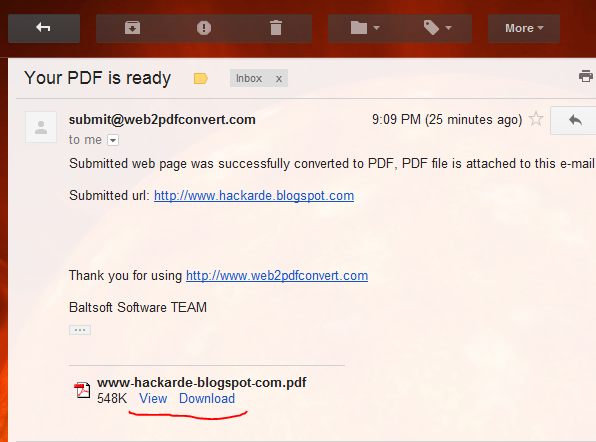
Wait For 5 to 10 Minute then you found a message in "INBOX" open it,this Email look like below pic...


Click on "VIEW" or "Download" option then you see PDF file of my blog like below pic...


Try it with different Website and given your good reply in comment Box.

If you like my work So plz Follow it.

Use Your Pen Drive as RAM

3 comments

Today i am tell about a trick by which you use your Pen Drive as a RAM and increase your system RAM successfully. Two different trick for different version of Windows. My first trick for Windows Vista and 7 and second trick for Windows Xp and below version.

So let's start.

TRICK 1:

This trick work for Windows 7 and Vista by which you use your Pen Drive as a RAM(Random Access Memory).

1. Insert your Pen Drive in system and go to property of Pen Drive by Right Click of Mouse.

2. Property Window open like below pic. Here click on "ReadyBoost Tab" and then you see radio button in which write "Dedicate this device to ReadyBoost". I am show it red color box in below pic...


3. Set your MB memory according to your requirement,and Press OK. All important work show in above picture.

TRICK 2:

This trick work in Windows Xp and below version but here i am use a Software which name is "ebooster" by which you change your Pen Drive space into RAM.

For Download Software Click HERE

1. When you download this software then you found a WinRAR file then extract it and Install software.

2. After Installation go to START and open "ebooster" then you see window like given below pic...


3. First select your Pen Drive in "Select Memory" option and then set require memory in MB then press OK.


I think it very helpful for you if you want use HARD DRIVE as a RAM then READ my old post...


If you like my work so plz follow my blog.

Find and Remove Carrier IQ from your Android Device

1 comments

We are use Carrier IQ for performance monitoring of the Smartphones means it is a service software by which your Smartphone secure but some researcher think it might be Key-logger or root kit by which your smartphone may be under risk.

Carrier IQ makes a new software that may be looging your every move of your Smartphone.

So if you want to check or if want this Keylogger removes from your Android Device then you can use LOGGING CHECKER developed by Trevor Eckhart.

This application help you to check logging activity which going in your mobile and also know where the logging data is going to.


This is a key for unlocking pro cleanup and removal features of logging test application.This is ONLY a license file, and must be installed after the main application is. Root is required because it will also install proper binaries required to system if they dont exist. You may uninistall this app completely 15 minutes after you activate your license.


National program for Cyber army to be launched in India

0 comments


Increasing attacks on cyberspace in India has brought several professionals and experts from the Industry, in support with the Government of India to jointly form a national level program to identify credible and valuable information security experts. The program "National Security Database" is all set to launch this Saturday in Mumbai at a major Information security conference, MalCon. The database will include ethical hackers and programmers who can protect country’s cyberspace. They will all be registered with the National Security Database, a brainchild of Information Sharing and Analysis Centre (ISAC), a non profit foundation which works closely with the Government on the issue of cyber security.

The need of such database originated after 2008 attacks in Mumbai when the cyber security professionals realised that a lot needed to be done in the area. "It is observed that some or other form of electronic notification is usually sent before a major terrorist attack, followed by defacement of government web sites. Professional cyber security professionals can make a lot of difference in investigations and help in the entire episode," said Rajshekhar Murthy, director of ISAC. Issue of forming a credible repository of such cyber security professionals who can be trusted with sensitive information can be of use in case of an emergency, and was also raised in a conference held last year.

"After a lot of brainstorming and analysis the database is in place and will be flagged off on November 26 in Mumbai," said Murthy. As per estimates there are over a lakh cyber security experts and hackers in India who as of now function individually. Each one of them has a certain area of specialisation. "They will be brought in to the NSD after a rigourous test which would test their skills. Also they would be made to undergo psychometric tests over and above the tasks that they would have to perform to test their personal skills. Once they clear all levels they would be empaneled in NSD program in applied areas of specialisation," added Murthy. Fraud investigation, web security, mobile security are some of the areas of specialisation in NSD.

The Database, which was secretly being worked on from last two years on invitation only basis has already a sizeable number of experts who have developed malwares and softwares to hack into devices like iPhone and XBox Kinect, which are slated for release at the malware conference MalCon. The database will come in handy each time country is under threat on cyberspace front. "The next generation of attacks will not be only on ground but also on country’s cyberspace," said Murthy citing the example of recent attack on some government computers after which the hackers released sensitive information pertaining to the miltary and communication between India and Moscow.

Companies like QuickHeal and Security Compass among others have already given support to the database and will be hiring security professionals with a direct final interview. "Since NSD professionals will have to go through a tough eight hour lab exam, major companies have written in expressing their interest in hiring NSD empaneled professionals. While NSD does not award certification, we are glad about the support from the Industry" stated Murthy.

The biggest challenge for NSD now is to reach both hackers and professionals and identify them with skills in existing areas of specialization.. "We have already identified several accross the country. Their motivations is that once they are registered with NSD they not only get to upgrade their skills and knowledge but will also be of service to the country. We are collaborating with government agencies looking after cyber security, all of whom are looking forward to the NSD," said Murthy.

The program will be flagged off in the International Malware Conference, MALCON, scheduled to be held at JW Marriott on November 26. Sachin Pilot, Minister of State for Communication and Information Technology is also going to join the conference via video conference from Delhi. His office confirmed that Pilot would share his views on cyber security and extend their endorsement to the National Security Database. Officials from National Technical Research Organisation, a government body which looks at cyber security, too have shown keen interest in the NSD. "It is great initiative which will be of use to the nation and will provide a databse of cyber security professionals," said an NTRO official refusing to be named.

How HTTPS secure you

3 comments

My this thread given you knowledge of HTTPS. HTTPS stands for 'Hyper Text Transfer Protocol Secure'. HTTPS combination of HTTP and SSL. For well knowledge i am explain it by divide into two part First HTTP and second SSL.

HTTP (Hyper Text Transfer Protocol):

http is a networking layer protocol that guide the transfer of Data between client and server.For example a browser to server and server to browser.Internet totally work on this protocol.

SSL ( Secure Socket Layer):

Secure Socket Layer is a service which provided by Web hosting company to a site on demand payment.SSL secure your request by encrypt and if i am say that it uses cryptography is not bad.It encrypt your request when you transfer to server and decrypt response by server. Many site like Facebook,Gmail,Twitter use this service. TLS is the enhance version of SSL. Some time before hacker hack the SSL 1.0 successfully by BEAST but not fear your Paypal and Gmail etc. secure because it use extreme version of SSL.

So when you use HTTPS service site then it encrypt your work on internet like ID name and Password.

But only few site provide this service.If you want you use HTTPS default so what are doing ?

I am going tell you,how you use HTTPS every time without any payment and secure your work.

This trick too simple if you like this then Given your good comment on HACKARDE and also Follow my Blog and Like FB page.

This trick work with only Mozila Firefox Web Browser So First Click HERE and download the Extension.A copy download Click on the download copy and Install it.

After Installation restart your Mozila Browser and you see a logo like below pic and right side upper corner.


Click on the Logo,a window open like below pic,here you set your own default settings.Some settings also set so do not take action.


After all them when you open your GOOGLE HOME PAGE then it open with HTTPS.

I am going show you some example.

When i am open www.99.se with Google Chrome browser then it open without and restriction like below pic...


But same Site i am open with my Mozila Browser then it show Untrusted sign with HTTPS like below pic...


One more example when i am open my Hackarde Facebook Page With Chrome then it open simply like below pic...


But when i am open my Facebook page with Mozila it show you HTTPS Connection like below pic...


My some Post also helpful for you...


I think it very helpful for you,Plz pass your comment because your comment encourage me for future.

Joomscan Security Scanner

0 comments

Joomscan Security Scanner updated recently with new database have 550 vulnerabilities. Detects file inclusion, sql injection, command execution vulnerabilities of a target Joomla web site. Last update for this tool was in August, 2009 with 466 vulnerabilities. now with the new ver this tool got 550 vulnerabilities.


Work in backtrack 5

download

For Read how to use this Tool Click HERE

Best Firefox Security and Privacy Add-Ons

1 comments

Today post make your firefox browser too secure for you.Here i am going tell you 10 secrity Add-one for your browser.




Do you find yourself often browsing websites while you should be doing work?
Are you afraid that one of these days your boss is going to catch you?

If so this extension is for you. It is called the Panic extension because it will save your butt just in case the boss sneaks up on you. In just a click this extension will close all your open tabs and replace it with a new page that you chose. The default settings will take you to a Google search of "Increasing Workplace Productivity". So if you are worried about getting in trouble, this extension will save your butt.


- Random rename tabs: change the titles of your tabs to random ones with a simple click. Nobody will suspect what pages are you reading...
- Select a new title for a tab, writing it or replacing a substring of the original title into another text.
- URL and domain automatic rename: rename all tabs with a certain URL or domain with the title you want, automatically.
- Bookmark integration: give the pages the same title you have in your bookmarks.


WOT is the leading website reputation rating tool and one of Mozilla’s most popular add-ons. Our safe surfing tool uses an intuitive traffic-light style rating system to help you know which websites are trusted when you search, surf and shop online.


The best security you can get in a web browser!
Allow active content to run only from sites you trust, and protect yourself against XSS and Clickjacking attacks.


Better Privacy serves to protect against special longterm cookies, a new generation of 'Super-Cookie', which silently conquered the Internet. This new cookie generation offers unlimited user tracking to industry and market research. Concerning privacy Flash-cookies are most critical.


Ghostery is built and maintained for users that care about their online privacy, and is engineered with privacy as a primary goal. Ghostery use is anonymous. No registrations or sign-ups are required. The Ghostery plug-in does not place cookies into your browser. Neither the Ghostery application nor Evidon receives any data from Ghostery users unless the user opts-in to participate in GhostRank. GhostRank data itslef is anonymous, is NEVER used for advertising targeting purposes, and is only shared in aggregated, non-personal, statistical form.


FoxyProxy is a Firefox extension which automatically switches an internet connection across one or more proxy servers based on URL patterns. Put simply, FoxyProxy automates the manual process of editing Firefox's Connection Settings dialog. Proxy server switching occurs based on the loading URL and the switching rules you define.


All browsers include a "View Source" option, but none of them offer the ability to view the source code of external files. Most websites store their javascripts and style sheets in external files and then link to them within a web page's source code. Previously if you wanted to view the source code of an external javascript/stylesheet you would have to manually look through the source code to find the url and then type that into your browser.rnrnWell now there's a much easier way. You can use the JSView extension to solve the problem.


If there are times you want to surf the web without leaving a trace in your local computer, then this is the right extension for you. What it does is temporarily disable the following:
- Browsing History (also in Address bar)
- Cookies
- Downloaded Files History
- Disk Cache
- Saved Form Information
- Sending of ReferrerHeader
- Recently Closed Tabs list


Close the current tab and forget about the visit : suppress the cookies related to the current page and, if configured, the whole domain from the history.

After installing the extension, find the new "close" button in the toolbar customization panel and drop it in your prefered place. Optionaly, you can add an entry in the contextual menu of each page.

Remember that you can also use + W (or other) to close'n forget a tab.


Install all Add-One and safe yourself.

Related Posts Plugin for WordPress, Blogger...

Hackarde's Search Engine- Search Hacking Tutorial,Tool and eBook

Loading
 
HACKARDE © 2011 | Designed by HrDe