Pages

Showing posts with label Proxy. Show all posts

Anonymous With SSH Tunnel + TOR

4 comments


Hello Friends!! today i am come with one more tutorial. I thought you read my old post  Anonymous on Cyber Space  http://www.hackarde.com/2012/05/how-to-use-tor-in-windows-for-anonymous.html  today post enhance of my last post. Today i am going to teach you use TOR with SSH Tunnel and use it on your Website hacking activity.

First Download two tool from here and Install it :


After installation of putty open it and follow my step:

Step 1: Click on Session in putty ,and on Host Name write shellmix.com and also change Port into 30 select SSH and after all that click on OK , see below pic...


Step 2: When you done step 1 then a black window open and ask you about Login as: like below pic. This is the putty configuration window.


Step 3: Now on Login as : type newuser  and when ask password then again type newuser , see below picture...


Step 4: When you done step 3 then shellmix window look like below pic...


Now for make your new account on shellmix enter your login name like below picture. I have enter by site name hackarde see below pic...


Step 5: After enter your login name it's ask about Password of your account so write password which you want for your account, see below pic..


Step 6: Now it ask password for MySql database so type different password for forward working...


Step 7: Now it ask Choose Editor so enter Pico , see below pic...


Step 8: Now in next step it ask about your language, my second language is English in available list so going to enter US , see below pic...


Step 9: Now it ask about vHost so write shell and press Enter Key , see below pic...


Step 10: Now Select Hard Disk space for MySql DB , i choose hdd1 , see below pic...


When all 10 Steps done then it show your account fill information and ask for continue , then press Enter Key , see pic...


Step 11: Now Again open putty and under session enter Hostname shellmix.com  , port 22 and select SSH , but never click on open button , in place of this go to left panel and select SSH , see pic..


Step 12: Under SSH click on Tunnels see below pic and Enter Source port :9090 and click ADD with also select Dynamic then OPEN...


Step 13: When step 12 done by you then again Shellmix black window and ask for Login as: now here enter your account name and press ENTER key see below pic....


For enter under your account , it ask Password of your account now enter your password of old step then press ENTER Key , see pic...


Step 14: When you done step 13 then window look like below pic , now again press ENTER key and without close black window leave from here....


Step 15 : Now open your TOR browser and go to TOR Extension and select "Option" there , when you have done it then a window pop up on screen . There click on Advanced then Network then Settings and last a new small window pop up. Here select Manual Proxy Configuration and enter Host 127.0.0.1 with your putty port means 9090 and press OK button and restart TOR browser, see below pic...


Step 16 : Now your TOR browser connect with SSH tunnel , when TOR browser open then it show you your fake IP see below pic...


Now go to www.ip2location.com and see about your IP detail like below pic....


SetUp Tunnel With Skype :


Open your skype login Window and click on Tool from list select "Connection option" see below pic...


Now when connection window open then fill it according to below pic , and press save then open your Skype ID , now your Skype ID connect over SSH Tunnel. 


Use this with your hacking activities and always anonymous on Cyber Space.

IF you think my work helpful for you then follow my site and encourage me for future post.

Enjoy Guys!!!!!!!!!!!!


How to use TOR in Windows for Anonymous working

3 comments


Hello friends, me with my new tutorial. I know you think about why i have down in this month in write the new thread, so wanna tell you now this time i am busy with my project. Well now a g8t Anonymous Web Surfing post here, mostly i used this with SQL Injection attack.

When you use TOR then you connect with a network who's that totally anonymous and never trace by your ISP because it's show a lot of user connection with one request.


Now 1st click on download file for install, when installation done then a folder open like below pic...


Now enter in folder and click on Tor Browser Icon like below pic...


When you done work of last line then a window pop up and show you connecting to Tor , like below pic..


Now you connect to Tor Network Successfully see below pic...


After last step a Browser window open automatically and showing you,your fake IP address , see pic...


See my real IP , which totally different from my fake IP....


If you wanna change your Identity again on TOR network then click on "Use a New Identity" like below pic, and you see your identity changed....


I think you also like this thread, so enjoy!!!!!!!

Toonel- Fast Internet and Anonymous Surfing

5 comments


After a long period i am again come on Fast internet topic with Anonymous Surfing (Proxy). Today i am telling you about a very nice tool which helpful for you on both above write topic . I think mostly new internet user never hear about it because further development of this multi-platform java-based application has been stopped since 2006.

toonel.net is a proxy server developed to save traffic. If you are paying a fee based on the amount of data you transfer (e.g. 3G/GPRS/DSL/CDMA/Satellite Internet Service) and have monthly download limit, or if you have narrowband connection (e.g. dialup modem) then you are most likely to appreciate the service toonel.net offers. There are number of toonel.net client application packages. All solutions are 100% Java based and therefore this service can be used on any platform with an installed Java Runtime Environment, including mobile phones.


Two profit of Toonel.net:

1. Toonel – for tunnel – does its job by compressing all the data traffic transferred to and from our machine. Smaller data sizes means shorter querying and loading times. This method will result in cheaper billing.

2.  Toonel also re-routes the traffic to a third party proxy server in an unknown location. This method will result in even faster and more secure data traffic.

So how to use Toonel, follow my write steps:

Step1: Go to Mozila Firefox Browser and Open "options" in Mozila, after that under option go to Advanced  and when a Advanced open then go to Settings.
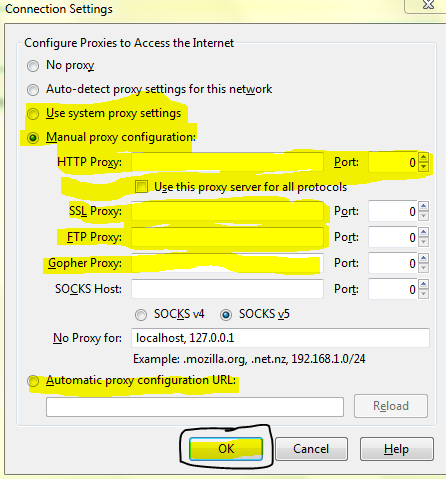
Click on the settings when u done it then a new window pop-up where set Manual Proxy Configuration.

Under Manual Proxy type HTTP Proxy is 127.0.0.1 and Port 8080.

Now Click on Ok and Close Option Window. See below pic for all work and set all thing according to this.


Step 2: Now open your download Toonel.net Tool and Click on Mapping after that select 127.0.0.1 and click on apply , see below pic...


Step 3: Now I am going to Mozila Browser and open my Website www.hackarde.com . When page start loading then go to Toonel.net and Check Compressed Out and In Data by click on Stats , See below pic..


Here you see a lot compression of Data between In to Out and Out to In .

This trick tool old and you never found it anywhere.


Proxy Bouncing

1 comments

Proxy Bouncing is a trick by which a user connects to or bounce off several different proxy servers before connecting to the actual destination system.

This trick mostly used by the computer's criminals to blind the investigation agencies completely off their track.

By Proxy Bouncing,a bad guys are able to confuse the investigation agencies and get without caught.


USER------>Proxy 1----->Proxy 2----->Proxy 3------>
Proxy 4------>Final Destination

In Above diagram,you see a good view of Proxy Bouncing who help you think about Bouncing.

A large number of proxy servers are involved in a proxy bouncing  so it is impossible for the attacker to be traced.Some MultiProxy tool also change Proxy Server periodically.


Tool 1: Name: MultiProxy (For Windows OS) Click Here For Download

Tool 2: Name: Wingate (For Windows OS) Click Here For Download

Tool 3: Name: Squid (For Linux OS)  Mostly comes with popular Linux


If You Like My work so Follow my Blog.Thanks!!!!!!!

Make Gmail Account Without SMS Verification

0 comments

Today thread tell you about Gmail email service hack by which you make a new Gmail account without SMS verification code.

When you make your new Gmail account then Gmail ask your Mobile number for send a verification code on your mobile by SMS,without this code you can never make your account on Gmail.My today trick helpful for you discard this step in way of making new Gmail account.


Concept: Concept here is only this you make a new account by unique name and password which never exits in Data Base of Gmail.You also make your account by proxy.

  1. Enter username which are unique itself,remember first and last username different and totally unique and it is not a number.
  2. For unique name watch and look any movie and take help of any movie tailor.
  3. For login name also use different name and remember it is never a number.
  4. Your Password unique and never use any number.
  5. Choose your own security question which unique and also answer.
  6. Do not enter recovery email address.
  7. The rest is at your choice.

If you want again make a account by same name then it does not exits without verification,I am make my account by "IMDBAAA@gmail.com" name without verification.

So Enjoy it!!!!

Socks 4/5 and HTTP Proxy

0 comments

Today post tell you how you online anonymity.For it we are use the online Socks and http server.

First thing here what is Socks?


Socks is a internet routed protocol that makes easier for packets to be routed between the client and server via proxy server.
Server is a structured as a set of processes and that offer services to the users,called clients.
Socks help users to connect with server so it is come under routed protocol according to Networking.
Socks protocol has a designated port,but it is not limited to that port,it port number is 1080.
Socks helpful get you by the network firewall,usually with schools or office,it open browsing for you.

Set your Socks and HTTP proxy:

For set proxy you need two thing...


2: List of online Socks and http Proxy with port number
For SOCKS proxy list go here

Start your Mozilla browser and Go to 'TOOL' click them and choose 'OPTION' a window open like below picture.
Where go to 'Advance' and then 'Network' and Click on 'Settings' all path shown below picture.


When you click on 'Settings' then new window open like given below...


Here go to 'Manual proxy configuration'.

Go to website which link given above and copy SOCKS Host name and port and ENTER in the Window shown location and then press OK button.

Your Proxy set on SOCKS4/5(According to your choice).

Enjoy it !

Plz given your comment easily by only enter your name and Email id and submit it because your response encourage me for future.

JonDoxFox

0 comments

JonDoFox is a profile for the Mozilla Firefox web browser particularly optimized for anonymous and secure web surfing. For anonymous surfing you need an IP changer proxy too. We recommended you proxy tool JonDo.


It is a great tool,it hide you with browser ,if any third party person track you then it find your IP address same to all other IP person whose use JonDoFox and it see you connected with multiple Server on net so he is not found your server on internet.

I am use this tool,and below show a picture which that shown you my Real IP address on DOS Prompt,my IP set by Jondofox and in my blog HACKARDE you see my fake IP which set by JonDoFox.


JonDoFox available for Windows,Mac OS and also for Linux OS.

For Download JonDoFox click here

Surf internet anonymously

1 comments


Today,I am going to tell you how we are surfing the internet anonymously.

Did you know your IP address is exposed every time you visit a website? Your IP address is your online identity and could be used by hackers to break into your computer, steal personal information, or commit other crimes against you. Hide My IP allows you to surf anonymously, change your IP address, prevent identity theft, and guard against hacker intrusions, all with the click of a button.

For download Hide My IP click here

Install it,when you start the Hide My IP then it shown your real IP address but when you click on the 'Hide My IP' button then it start working and change your IP address with country.


For stop it click on the 'Stop Hiding IP' button.


Proxy- Hide your ip address

2 comments

After a great proxy post today i am introduse you with Invisible Browsing,It is a tool by which you can change your real ip address with fake ip address.No any person trace your right location and do not done any hacking activity with you.


For Downloading click here.

Set the manual proxy settings on your browser

0 comments

Here i am tell you how to set manual settings of proxy for your Mozila Firefox browser.First open your Mozila Browser and look in the upper left corner given a object Tool...


Click on the Tool,you see a list in which given many function click on the 'option'.After that you see a new window like given below...


Go to 'Advance' and after than 'Settings'.Than open a new window like given below..


Set Manually and Enter the proxy site name which you like for use.

Web Surfing Proxy

1 comments

What is a proxy?
A proxy is an address of a proxy server that is placed between your computer and the internet :
Normal :
Computer --------> Internet

With proxy :
Computer ---------> Proxy server -----------> Internet


The advantage of a proxy is that if you hack the would get your ip address but the address of the proxy server. Same if ur a normal internet user the hacker won't get ur ip but the ip of the proxy server.

Kind of Proxies:
Private proxies : They are only for you (it's the same like buy your own ip address ) and will cost 15-20$
Public Proxies : They are for everyone but the problem is sometimes you can get fast proxy's and sometimes slow ones. If you have a good site/list with fast proxy's there as good as private proxy's

Proxy software:
Use the proxy software,for download click below..
Here

For free proxy use the proxy website like www.proxy.org,www.proxyforfree.org etc.

Related Posts Plugin for WordPress, Blogger...

Hackarde's Search Engine- Search Hacking Tutorial,Tool and eBook

Loading
 
HACKARDE © 2011 | Designed by HrDe