Pages

Showing posts with label Cracking. Show all posts

Offline R00T Access in Linux

1 comments


Hello friend, today tutorial tell you how to root access in Linux. Use this thing when you forget your Linux password . It is possible but only then if there is no grub menu encrypted, if not we are able to have a root access. but WHAT IS GRUB MENU ?

GRUB or the GRand Unified Bootloader is the bootloader commonly installed by Linux distributions on your hard disk. GRUB is responsible for showing you the menu that allows you to choose the operating system you want to boot into and also lets you tweak and control the booting options.


First of we need to have access to grub menu.You may see it when u have different OS on one computer or at least a few kernels. For Example when you start your Backtrack then it's show you different kernal .

When you see grub menu timer, just stop it by narrow buttons (up or down button of keyboard), we have stopped grub menu timer, see below pic...


For play with root privileges press "e" key on your keyboard..and now we can see (boot) properties. Choose second line which starts from kernel /vmlinuz.....
Press "e" again and go to end of this statement.
Now press "space" and type:   

single linux

Now press Enter button and then press "b" key, Now you get Root Privileges which look like:


[root@computername] #

After that you may add new user by below command :

adduser r00t1

passwd t00r1

Change old user password by command : 

passwd olduser


Hope this work for you and also very useful. Enjoy!

Facebook >> http://www.facebook.com/pages/Hackarde/164165403639196?sk=wall

Twitter >> http://twitter.com/#!/hackarde

Crack MD5 Hashes

6 comments


Today i am going to show you a tool by which you easily decrypt the MD5 Encrypted Hashes. The name of the tool is PasswordPro.


This is a Winrar file so after download extract it when u going under the PasswordPro folder,there you see a PasswordPro.exe file ,run this file.After run this open your Notepad and write your MD5 Hash Code which you want to decrypt and save it on same folder of PasswordPro or any where,see below pic...


Now go to PasswordPro Running program and click on File when you do it then a tab open where you see a option given which called "Import" , see below pic...


Now select your save Notepad copy from the saving place.


when you did it then a window of Import Users open where select type of Hash which type of hash you use and enter format is salt. see below pic...


Now go to "Audit" and select the type of attacks, "Preliminary attacks" default set but here for my hash i am select "Brute Force attacks" , see below pic..


Now go to "Start Attacks" see above pic and run it, when your process run then it look like below pic...


Wait for some time your result come after full process.

All Password Unlocker

0 comments

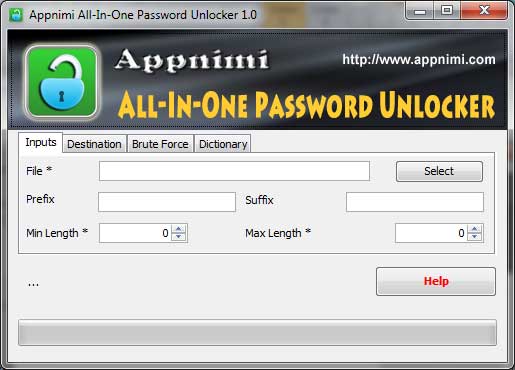
Appnimi Password Unlocker is a All-in-one free tool to recover password of different type of protected files including ZIP, RAR, PDF, XLS, XLSX etc. It supports both Dictionary and Brute-force password recovery techniques allowing user to recover easy as well as complex passwords.  
For ZIP and RAR type, after recovering the password it will extract the files to a destination folder. For other types it will keep the unlocked version to the destination folder.

New version v2.0 adds the 'Multi Session Password Recovery' support which allows you to pause the password recovery operation anytime and continue later on. You can also save & load the existing configuration without specifying it each time.  

It works on wide range of platforms starting from Windows 98 to latest operating system, Windows 7.


PasswordUnlocker is easy to use with its simple GUI interface even for beginners. 

Here are the brief usage details,
1.Run "Password Unlocker" after installation by clicking shortcut on your desktop.
2.Enter or select the path of the file whose password is to be recovered.
3.Enter the optional prefix or suffix parameters.
4.Enter the minimum and maximum length
5.Select Brute Force or Dictionary method
6.Enter the possible characters (Brute-Force) or path to dictionary/wordlist file (Dictionary method).
7.Click on Start to begin the password recovery operation.

During recovery operation, you will see the status of operation at each stage. More complicated the password, more the time will be taken.

Tool-Decrypt Password Protected PDF Files

0 comments


My Today post related with cracking.I am going tell you a tool by which you decrypt the password protected PDF files.

I think it is very helpful for you and make easy your work and save your time.

PDF Password Remover Tool is a PDF decryption tool developed by PDF Technologies that can be used to decrypt password protected PDF files

Free PDF Password Remover Tool can remove owner password from PDF files. PDF files with the owner password set would prevent viewers from editing, selecting text, printing and otherwise changing any of the pdf properties such as form fields etc.

This PDF Password Remover tool will decrypt and remove owner passwords from any PDF document.


Just open the password protected PDF file and click on Convert button to remove the PDF password. However, The Password Remover tool will NOT work with PDF files that have a user password set.

For Download this tool click HERE

Related Posts Plugin for WordPress, Blogger...

Hackarde's Search Engine- Search Hacking Tutorial,Tool and eBook

Loading
 
HACKARDE © 2011 | Designed by HrDe