Hacking Tutorial
Featured Posts
-
Username and – Password
Make it strong for Security
-
Report: Thousands of embedded systems on the net without protection
At the RSA Conference, which is ongoing, Zscaler's Michael Sutton has provided further evidence that many embedded web servers (EWS) can be easily accessed by outsiders via the internet.
-
Fake Netflix Android App Steals Passwords
Watching a movie or TV show on your mobile phone may be convenient, but it is not necessarily safe.
-
Fake antivirus will not disinfect your computer!
.
-
Google kicks fraudulent apps out of Android Markets
Mobile security firm Lookout is warning Android users in Europe about a slew of apps that showed up on the Android Market in the last week that are not what they appear to be.
Stop Facebook from tracking the webpages you go to
Collection Of HAKIN9 Articles
Google Music Goes Public

Discover.
Find music you love. Check out Android Market for staff-picked rising artists and great bands from your favorite genres. Meanwhile, Google Music works seamlessly with Android Market to offer personalized recommendations based on what you listen to most. And when you're not shopping for new music, rediscover your own library by creating an Instant Mix.
Shop.
Buy now, listen now, sync never. There are hundreds of free songs and millions more to buy on Android Market. The music you choose is automatically stored in your Google Music library and instantly ready to play or download.
Listen.
Access your Google Music library anywhere and anytime - no syncing, no wires. Stream music instantly on the web and listen on your Android phone or tablet with the Google Music app. Not online? No problem. Just save your favorites to your mobile device for offline playback.
Organize.
Keep all your music in one place. Anything you get from Android Market is automatically stored in your Google Music library and you can add up to 20,000 of your own songs -- all for free. With your music saved online, you have even more space for all the other things you love.
Share.
Sharing is caring. For songs purchased from Android Market, you can share a listen with your friends on Google+.
Want Something Like This
Your YouTube page like this...
Make Gmail Account Without SMS Verification

- Enter username which are unique itself,remember first and last username different and totally unique and it is not a number.
- For unique name watch and look any movie and take help of any movie tailor.
- For login name also use different name and remember it is never a number.
- Your Password unique and never use any number.
- Choose your own security question which unique and also answer.
- Do not enter recovery email address.
- The rest is at your choice.
One Boot CD For Install All Linux Version
- Ubuntu
- Debian GNU/Linux
- Fedora
- OpenSUSE
- Mandriva Linux
- Scientific Linux
- CentOS
- Slackware
After all above work done you see a new screen where all Operating System name given like below pic,i am choose "ubuntu" Linux operating system and click OK...
[Winner] Hackarde 2nd Contest Winner Announcement

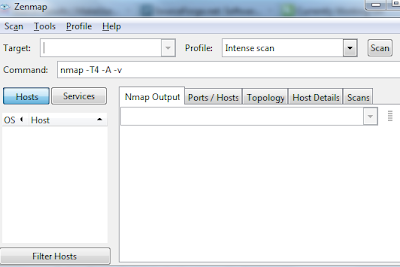
Nmap - Secure Your Wi-Fi network
If you do not idea about your Private IP address which use in your network so for it go to Your Router Admin Panel and set the Range by which in your setting range DHCP allot Private IP for all connected Device.For help look below pic...
It show you all open port in your network,sometime virus open a port it also trace it and show you like below pic.If you want Trace a range then enter CISDR of want Range like
Trace Your Friend and Family Member Location By His Phone
This link open a web page where free downloading of software given,but i am given direct link for you..
Send Free Faxes From Your Android Phone
New users can Sign-up for a free 1000 MB account directly from the application Send faxes directly from your app to any fax number, worldwide.
Let's Get Started:
1. Login to FilesAnywhere by your android phone.
2. Select the Send/Share tab from the tool bar like below pic...

3. Click the SendFax option in the Sharing Options screen.

4. Use the Browse Files button to select files, or use the folder tree to select the document. Click Add Selected.

5. Fill in the appropriate fields within the Recipient, Senders Details, and Cover Page tabs.


6. Click the Send Fax button.

7. A prompt then lets you know your fax is being sent, and you'll receive an email with confirmation of your fax status.
8. To view the Fax History log, reopen the Send/Share menu and click the Fax History link on the Send Fax button.

9. The Fax History Log will display a list of all sent and received faxes.

Important Information About Faxing with Your FilesAnywhere Account:
- Free accounts are allowed a maximum of 10 outbound faxes a month.
- Web Basic and Web Advanced plans are allowed up to 500 outbound domestic faxes, or 100 outbound international faxes per month
Your Android Mobile Screen look like below pic...
Hackarde's Search Engine- Search Hacking Tutorial,Tool and eBook
Popular Posts
Labels
- Android (1)
- AntiVirus (6)
- BackTrack Series (19)
- Batch Programming (2)
- Book (8)
- Command Prompt (6)
- Contest (4)
- Cracking (4)
- Gmail (4)
- Hacking (89)
- Hacking Lab (3)
- Hardware (2)
- Internet (40)
- IP Address (13)
- Javascript (2)
- Keylogger (4)
- Linux (1)
- Malware (2)
- Media Player (1)
- Metasploit (2)
- Mobile (11)
- Network Security (2)
- News (25)
- openssl (1)
- Phishing (2)
- Proxy (11)
- Security (61)
- Social Networking (21)
- System (29)
- Tool (50)
- Video Tutorial (2)
- virus (7)
- VPN (1)
- vulnerability (1)
- Web Browser (30)
- Web Hacking (28)
- WebTrick (47)
- windows feature (25)
- Wireless Hacking (3)
- YouTube (4)